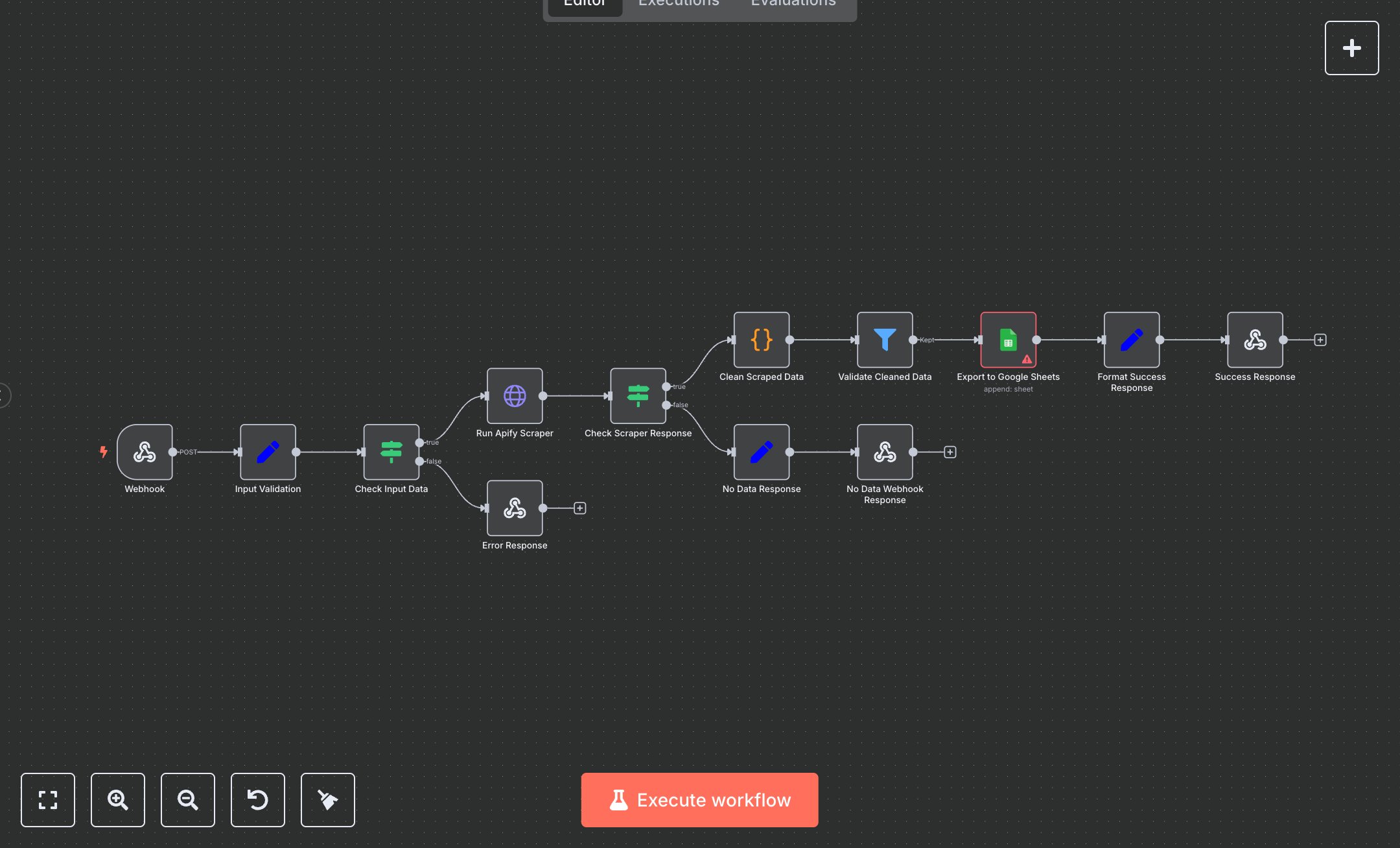
Lead Scraping & Google Sheets Export with Apify
This workflow automates manual lead generation processes, where sales teams spend hours browsing directories, copying company details like names, websites, phones, and emails into spreadsheets, often yielding inconsistent data and missing opportunities. It replaces this with an API-driven scraper using Apify actors to extract structured leads from websites, cleaning and validating them before appending to Google Sheets for seamless CRM integration. Key nodes include: Webhook trigger for POST requests with parameters; Set node for input validation of Apify token, task ID, and sheet details; IF node to check validity; HTTP Request to run Apify scraper synchronously; another IF to verify results; Code node to clean and standardize fields (e.g., phone formatting, email lowercase); Filter to retain leads with company name or phone; Google Sheets node to append rows; Set for success metrics; and Respond to Webhook for JSON output. This empowers sales and marketing teams in SMBs and startups managing 100-500 monthly leads, reducing errors from manual entry by 90% and enabling focus on outreach.\n\nRealize 15 hours/week savings processing 200+ leads, translating to $750/month ROI at $30/hour rates, plus 20% higher conversion from fresher data. Suited for B2B SaaS firms scraping tech directories or real estate agents pulling listings; scales to 1,000 leads/day on higher tiers. Requires Apify Starter ($39/month + usage), n8n Cloud Starter ($20/month for 2,500 executions), and free Google Sheets API via Workspace ($6/user/month). Handles up to 10,000 monthly scrapes before scaling limits.\n\nSign up at cloud.n8n.io for hosted n8n or download from n8n.io for self-hosting (Docker, Node.js 18+). Obtain Apify token: Log in at console.apify.com, navigate to Integrations > API, generate token. For Google Sheets, enable API at console.cloud.google.com/apis/library/sheets.googleapis.com, create OAuth2 credentials (service account), download JSON key, add to n8n credentials. Import workflow JSON into editor. Configure Webhook path: 'api/lead-scraper', method POST. In HTTP Request, set URL to 'https://api.apify.com/v2/actor-tasks/{{$json.apify_task_id}}/run-sync-get-dataset-items?token={{$json.apify_token}}' with 5-min timeout. Link Google Sheets credentials, map columns like company_name to {{$json.company_name}}.\n\nTest via Postman: POST to webhook URL with body {'apify_token':'your_token','apify_task_id':'your_task_id','google_sheet_id':'1abc...','sheet_name':'Leads'}; verify sheet appends and response JSON. Common errors: 400 invalid input (ensure all params present); Apify 401 (regenerate token); empty results (no_data status—check actor config). Deploy by activating workflow, expose webhook publicly. Maintain: Monitor Apify dashboard for usage, rotate tokens annually; optimize by customizing Code node for niche fields. Use mock data pre-live to avoid rate limits.", "businessValue": "Saves 15 hours/week scraping and exporting 200+ B2B leads automatically", "setupTime": "20-30 minutes", "difficulty": "Beginner", "requirements": ["Apify Starter subscription ($39/month)", "n8n Cloud Starter ($20/month)", "Google Sheets API access (free with Google account)", "Basic webhook testing tools like Postman"], "useCase": "Automating web-based B2B lead generation for sales pipelines"
$5.49
Workflow steps: 13
Integrated apps: webhook, set, if