LLM Gmail Summaries and Action Item Detection
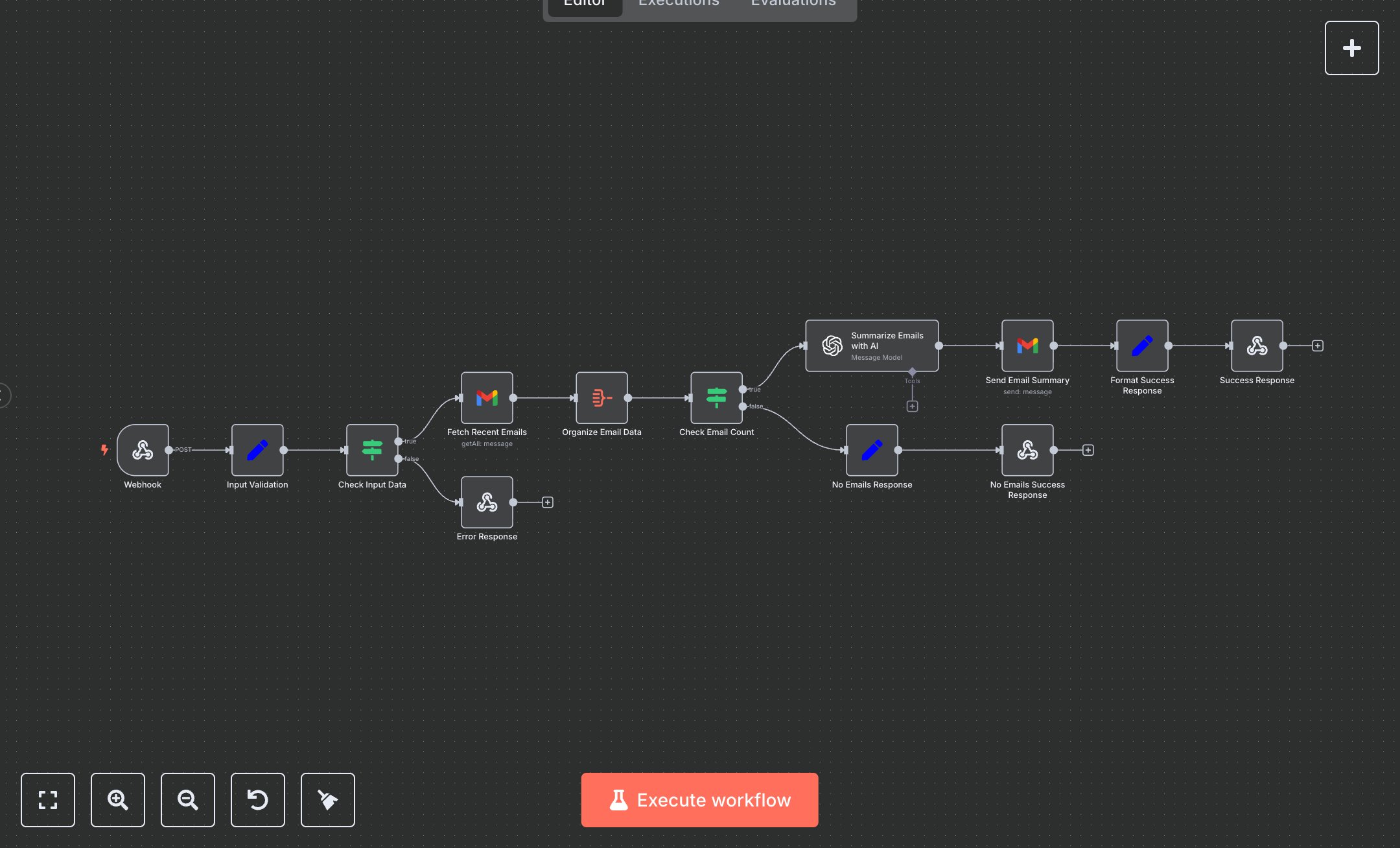
This workflow generates AI-powered email summaries from Gmail, identifying key details and action items. Key nodes include Webhook (handles POST requests at /api/email-summary), Input Validation (sets email_address, recipient_email, hours_back), Fetch Recent Emails (retrieves Gmail emails), Organize Email Data (aggregates email fields), Summarize Emails with AI (uses gpt-4o-mini for summaries), Send Email Summary (sends HTML report), Success Response (returns JSON), No Emails Response (handles empty results), and Error Response (manages invalid inputs). Customize AI prompts in Summarize Emails with AI node.\n\nSetup Requirements and Configuration: Install n8n from n8n.io for self-hosting or sign up at cloud.n8n.io. Obtain a Gmail OAuth2 token from console.developers.google.com by enabling Gmail API and creating credentials. Get an OpenAI API key from platform.openai.com under ‘API Keys.’ Import the JSON workflow in n8n. Configure Gmail (Fetch Recent Emails, Send Email Summary) and OpenAI (Summarize Emails with AI) nodes with respective credentials under ‘Credentials.’ Set Webhook node to HTTPS with path ‘api/email-summary’ under Settings > Webhook. Use ngrok for local HTTPS testing. Ensure stable internet for API requests.\n\nTesting and Deployment Steps: Activate the workflow to get the Webhook URL (e.g., https://your-n8n-instance/api/email-summary). Test with POST requests, e.g., { "email_address": "user@gmail.com", "recipient_email": "team@example.com", "hours_back": "24" }. Success responses return JSON with emails_processed and status. No Email Response returns if no emails are found. Error response (HTTP 400) occurs for invalid inputs. Check n8n logs for errors like ‘Invalid Gmail OAuth token,’ ‘OpenAI API key missing,’ or ‘Webhook inaccessible.’ Validate outputs: ensure HTML email report lists summaries and action items, and JSON response confirms emails_processed. Debug using n8n logs for credential or network issues. Verify email delivery in the recipient’s inbox and action items’ accuracy. Adjust hours_back in the POST body to change the time range.
$6.99
Workflow steps: 13
Integrated apps: webhook, set, if