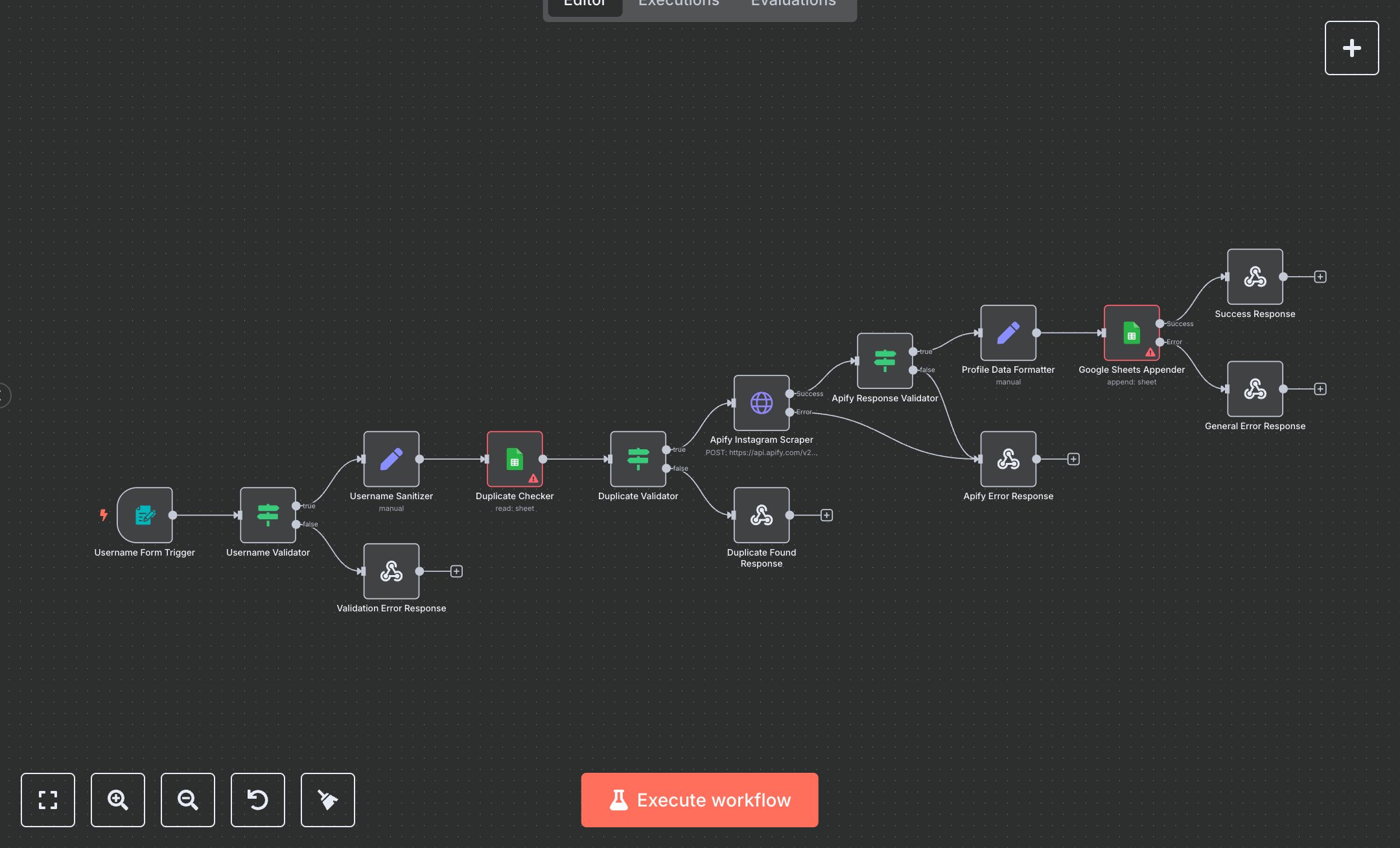
Instagram Scraper to Extract Profile Data into Google Sheets
This workflow automates scraping Instagram profile data using Apify and stores it in Google Sheets. Key nodes include Username Form Trigger (captures username input), Username Validator (checks input format), Username Sanitizer (cleans username), Duplicate Checker/Validator (prevents duplicate entries), Apify Instagram Scraper (fetches profile data via API), Profile Data Formatter (structures data), Google Sheets Appender (saves data), and response nodes (Success Response, Validation Error, Duplicate Found, Apify Error, General Error).\n\nSetup Requirements and Configuration: Install n8n from n8n.io for self-hosting or sign up at cloud.n8n.io for cloud setup. Follow prompts or create a cloud account. Create an Apify account at apify.com, navigate to ‘Instagram Profile Scraper,’ generate an API token, and note the task ID. Create a Google Sheet named ‘Instagram Profile Data’ with headers: Username, Full Name, Followers Count, Following Count, Biography, Profile Pic URL, External URL, Is Verified, Is Private, Posts Count, Scraped At. Obtain Google Sheets OAuth credentials via Google Cloud Console: enable Sheets API, create credentials. In n8n, import the JSON workflow. Configure Apify Instagram Scraper with API token and task ID. Set the Google Sheets Appender with OAuth credentials and document ID. Ensure HTTPS for webhook (Username Form Trigger). Verify server supports API calls.\n\nTesting and Deployment Steps: Activate the workflow to get the form URL. Access it in a browser, enter a valid Instagram username (e.g., ‘example_user’), and submit. Success response (200) returns username, fullName, followersCount, isVerified, and scrapedAt. Error responses include 400 (invalid username format), 409 (duplicate username), 503 (Apify scrape failure), or 500 (internal error). Check logs for errors like ‘Invalid API token,’ ‘Private profile,’ or ‘Google Sheets access denied.’ Validate output in Google Sheets: ensure all columns (e.g., Biography, Posts Count) are populated correctly and Scraped At is current. Debug using n8n logs for issues like network failures or invalid credentials. Ensure stable internet for Apify and Google Sheets APIs.
$6.99
Workflow steps: 14
Integrated apps: formTrigger, if, set