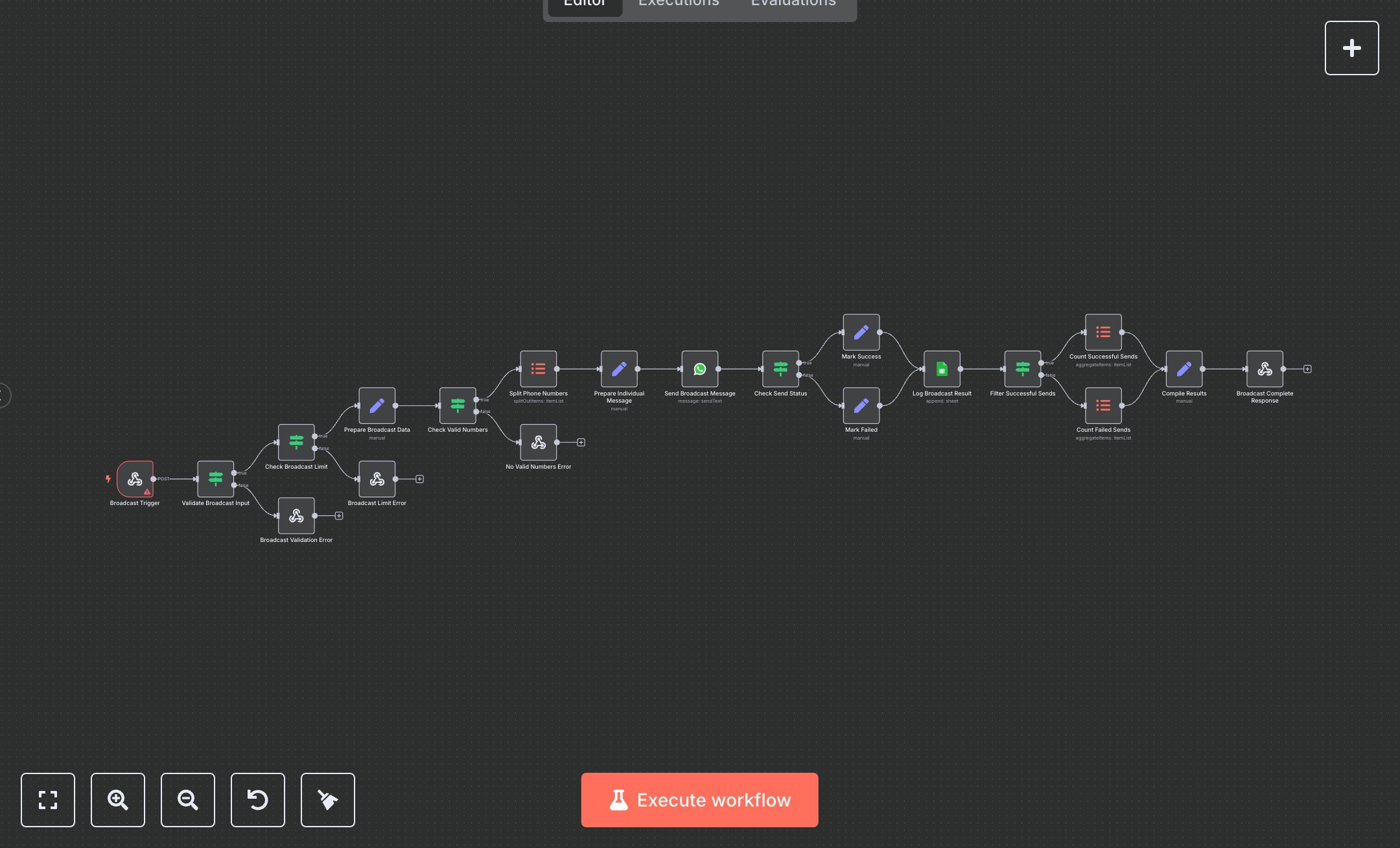
WhatsApp Broadcast: Bulk Message Sending, Validation, and Tracking
This workflow automates bulk WhatsApp messaging, replacing manual copy-paste or third-party tools that take hours for marketing teams. The Broadcast Trigger Webhook receives POST requests with message and phone list, the Validate Broadcast Input If node checks required fields, the Check Broadcast Limit If node enforces 1,000-recipient cap, the Prepare Broadcast Data Set node sanitizes numbers, the Check Valid Numbers If node filters invalid formats, the Split Phone Numbers Item Lists node processes individually, the Prepare Individual Message Set node sets per-number data, the Send Broadcast Message WhatsApp node delivers texts, the Check Send Status If node routes success/fail, the Mark Success/Failed Set nodes log outcomes, the Log Broadcast Result Google Sheets node records details, the Filter Successful Sends If node separates results, the Count Successful/Failed Sends Item Lists nodes tally metrics, and the Compile Results Set node summarizes for the Broadcast Complete Response Respond to Webhook node. It aids marketing teams in small businesses (10-50 staff) sending 500+ messages monthly, enabling compliant, trackable campaigns without spreadsheets or delays.\n\nThis workflow saves 5-8 hours weekly broadcasting to 500+ contacts, cutting errors by 90%. Use cases include promotional alerts, appointment reminders for e-commerce/retail. Suitable for growing firms. Requires WhatsApp Business API (free with Meta Business Suite), Google Sheets (free), n8n (free self-hosted or $20/month cloud). Scalable to 10,000 messages/month with API upgrades.\n\nInstall n8n via n8n.io or cloud.n8n.io. Get WhatsApp Business API credentials at business.facebook.com (create app, get phone number ID). For Google Sheets, create sheet at docs.google.com, get ID. Set env vars: WHATSAPP_PHONE_NUMBER_ID. Import JSON, configure Webhook POST path 'whatsapp-broadcast' with header auth (e.g., API key). Update Google Sheets node with spreadsheet ID and columns (Date, Time, Status, etc.).\n\nTest with Postman: {message: 'Hi!', phone_numbers: ['+1234567890']}. Verify Sheets log and WhatsApp delivery. Errors: Invalid numbers (use E.164), limits exceeded (reduce batch). Activate webhook. Monitor dashboard weekly. Optimize with delays for high volumes; refresh tokens quarterly.", "businessValue": "Saves 5-8 hours/week broadcasting to 500+ contacts", "setupTime": "30-45 minutes", "difficulty": "Intermediate", "requirements": ["WhatsApp Business API (free with Meta Business Suite)", "Google Sheets API (free)", "n8n instance"], "useCase": "Bulk WhatsApp messaging for marketing campaigns"
$6.99
Workflow steps: 20
Integrated apps: webhook, if, respondToWebhook