WhatsApp Business: Process Incoming Messages and Respond Automatically
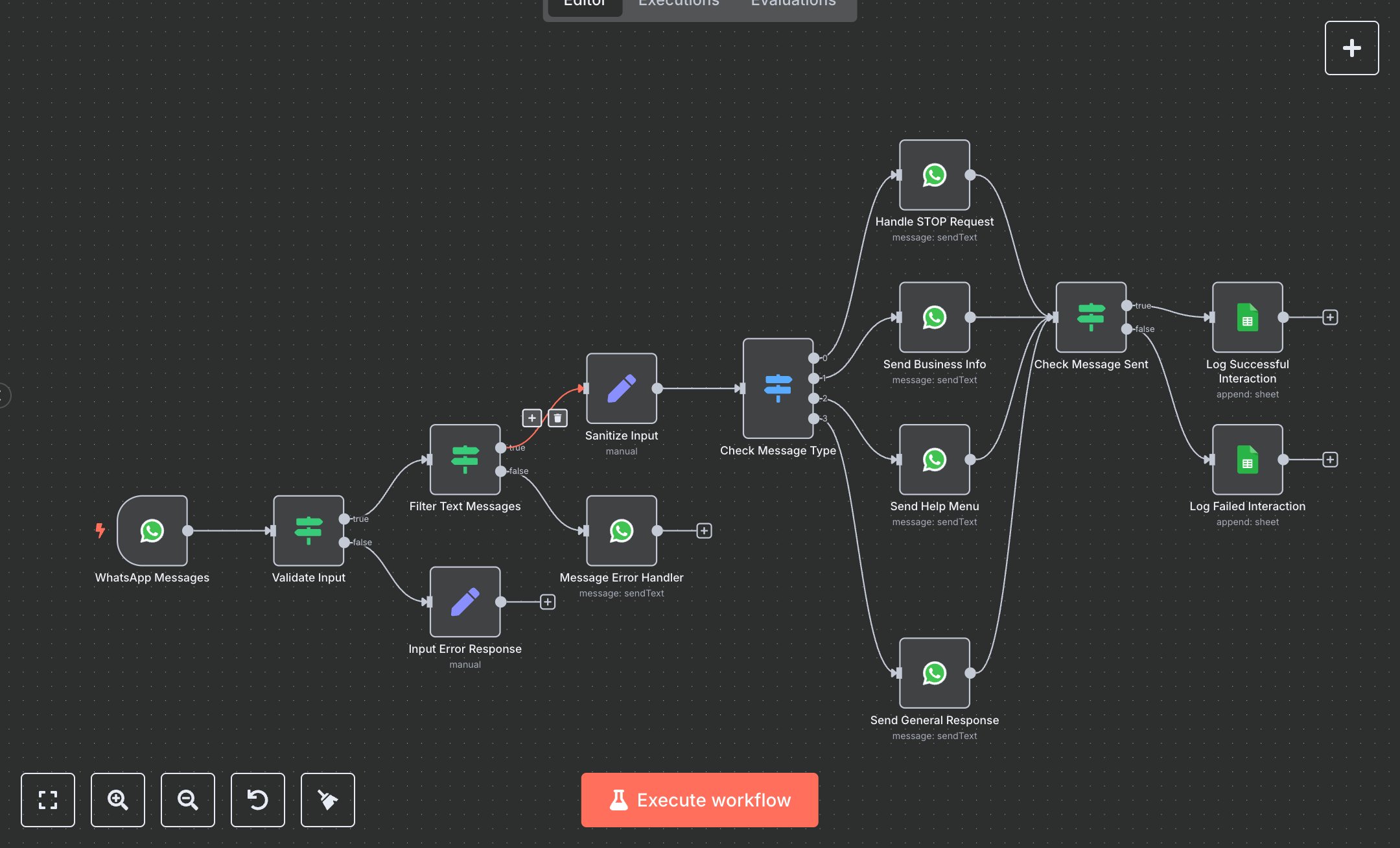
This workflow automates WhatsApp Business message handling, processing incoming messages with commands like STOP, INFO, or HELP. Key nodes include WhatsApp Messages (triggers on new messages), Validate Input (checks message data), Filter Text Messages (ensures text content), Sanitize Input (cleans data), Check Message Type (routes commands), Handle STOP Request/Send Business Info/Send Help Menu/Send General Response (sends replies), Check Message Sent (validates delivery), and Log Successful/Failed Interaction (logs to Google Sheets).\n\nSetup Requirements and Configuration: Install n8n from n8n.io for self-hosting or sign up at cloud.n8n.io for cloud setup. Follow prompts or create a cloud account. Obtain WhatsApp Business API credentials via developers.facebook.com: create a Meta Developer account, set up a WhatsApp Business app, get an access token, and note the phone number ID. In n8n, import the JSON workflow. Configure WhatsApp Messages and response nodes (e.g., Send Business Info) with the access token under ‘Credentials’ > ‘WhatsApp Business API.’ Replace YOUR_PHONE_NUMBER_ID in nodes with your phone number ID. For logging, set up Google Sheets credentials via console.cloud.google.com, create OAuth2 credentials, and add the spreadsheet ID to Log Successful/Failed Interaction nodes. Set WhatsApp Messages webhook to ‘whatsapp-message-handler’ and ensure HTTPS access.\n\nTesting and Deployment Steps: Test by sending a WhatsApp message (e.g., ‘INFO’) to your business number. Success responses include replies like business info or help menu, logged in Google Sheets with timestamp, phone number, and status. Error nodes return messages for invalid inputs (e.g., missing message text) or log failures (e.g., ‘Message send failed’). Check logs for errors like ‘Invalid access token,’ ‘Phone number not registered,’ or ‘Rate limit exceeded,’ and verify credentials or IDs. Activate workflow in n8n. Validate output: ensure replies match commands (e.g., STOP unsubscribes), logs include correct phone_number and sanitized_message, and timestamp is current. Debug using n8n logs for issues like invalid tokens or network errors.
$6.99
Workflow steps: 14
Integrated apps: whatsAppTrigger, if, set