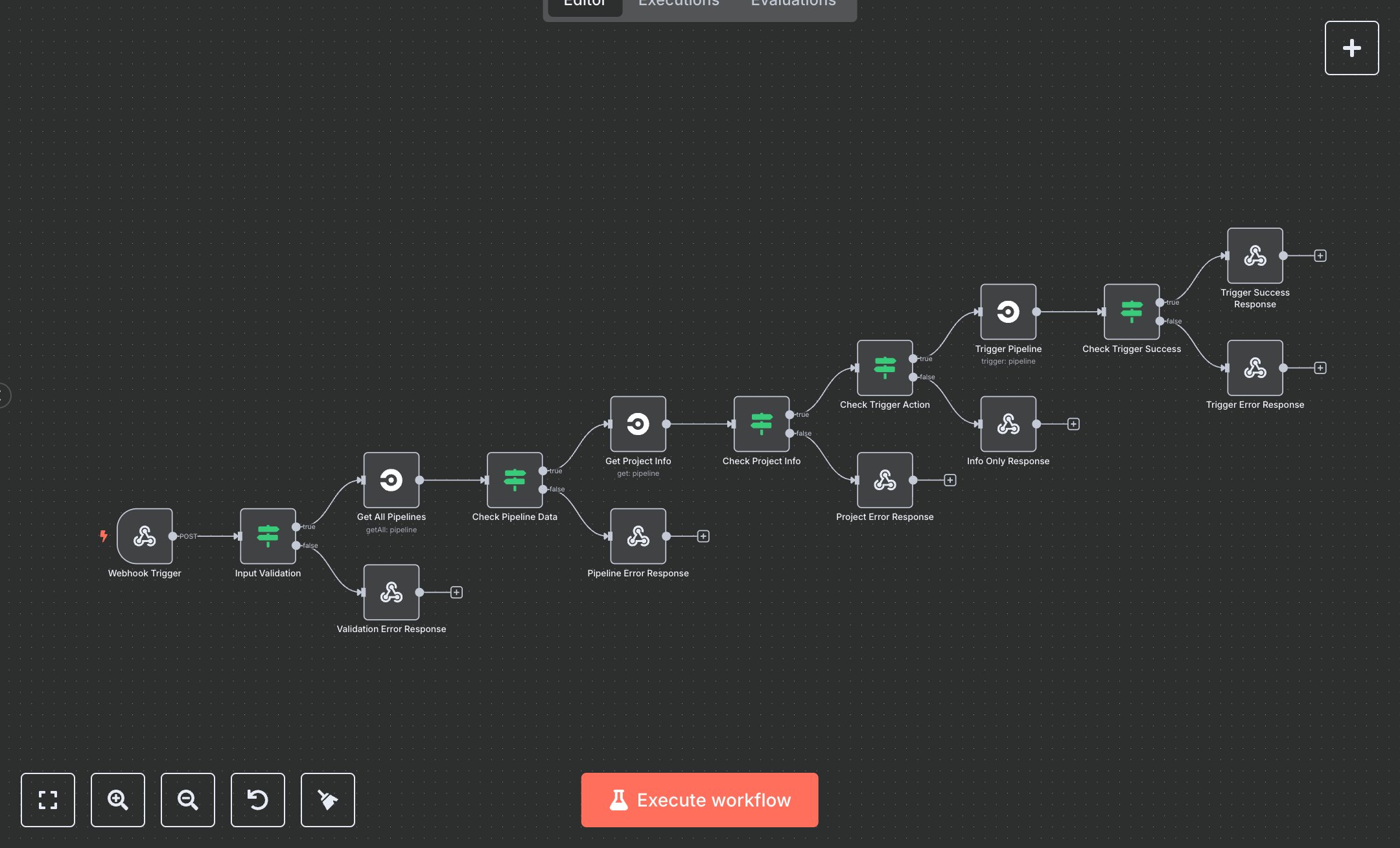
CircleCI Pipeline: Trigger, Fetch, and Manage Projects
This workflow automates CircleCI pipeline management, fetching pipeline/project data, or triggering pipelines. Key nodes include Webhook Trigger (starts via POST), Input Validation (checks projectSlug/vcs), Get All Pipelines (fetches pipeline data), Get Project Info (retrieves project details), Check Pipeline/Project Data (validates responses), Check Trigger Action (routes for trigger), Trigger Pipeline (initiates pipeline), Trigger Success Response (returns results), and error nodes (Validation/Pipeline/Project/Trigger Error Response) for failures.\n\nSetup Requirements and Configuration: Install n8n from n8n.io for self-hosting or sign up at cloud.n8n.io for cloud setup. Follow prompts or create a cloud account. Obtain a CircleCI Personal API Token from circleci.com: log in, go to 'User Settings' > 'Personal API Tokens,' generate a token, and copy it. In n8n, import the JSON workflow. Configure Get All Pipelines, Get Project Info, and Trigger Pipeline nodes with the token under ‘Credentials’ > ‘CircleCI API.’ Set Webhook Trigger path to ‘circleci-pipeline,’ configure for POST requests, and set allowedOrigins to ‘https://*’ for secure access. Optionally add header authentication (e.g., ‘Authorization: Bearer your-key’). Ensure server supports API calls.\n\nTesting and Deployment Steps: Test with Postman using a POST request to the Webhook URL. Example JSON: {'projectSlug': 'gh/username/repo', 'vcs': 'github', 'action': 'trigger', 'branch': 'main'} or {'projectSlug': 'gh/username/repo', 'vcs': 'github'} for info only. Success responses return 200 with pipelines, project data, or triggered pipeline details and a timestamp. Error nodes return 400 for invalid projectSlug/vcs or 500 for API failures. Check logs for errors like ‘Invalid token’ or ‘Project not found,’ and verify credentials or inputs. Activate workflow in n8n. Validate output: ensure pipelines array is valid, project slug matches input, and timestamp is current. Debug errors using n8n logs for rate limits, invalid slugs, or network issues.
$6.99
Workflow steps: 15
Integrated apps: webhook, if, respondToWebhook