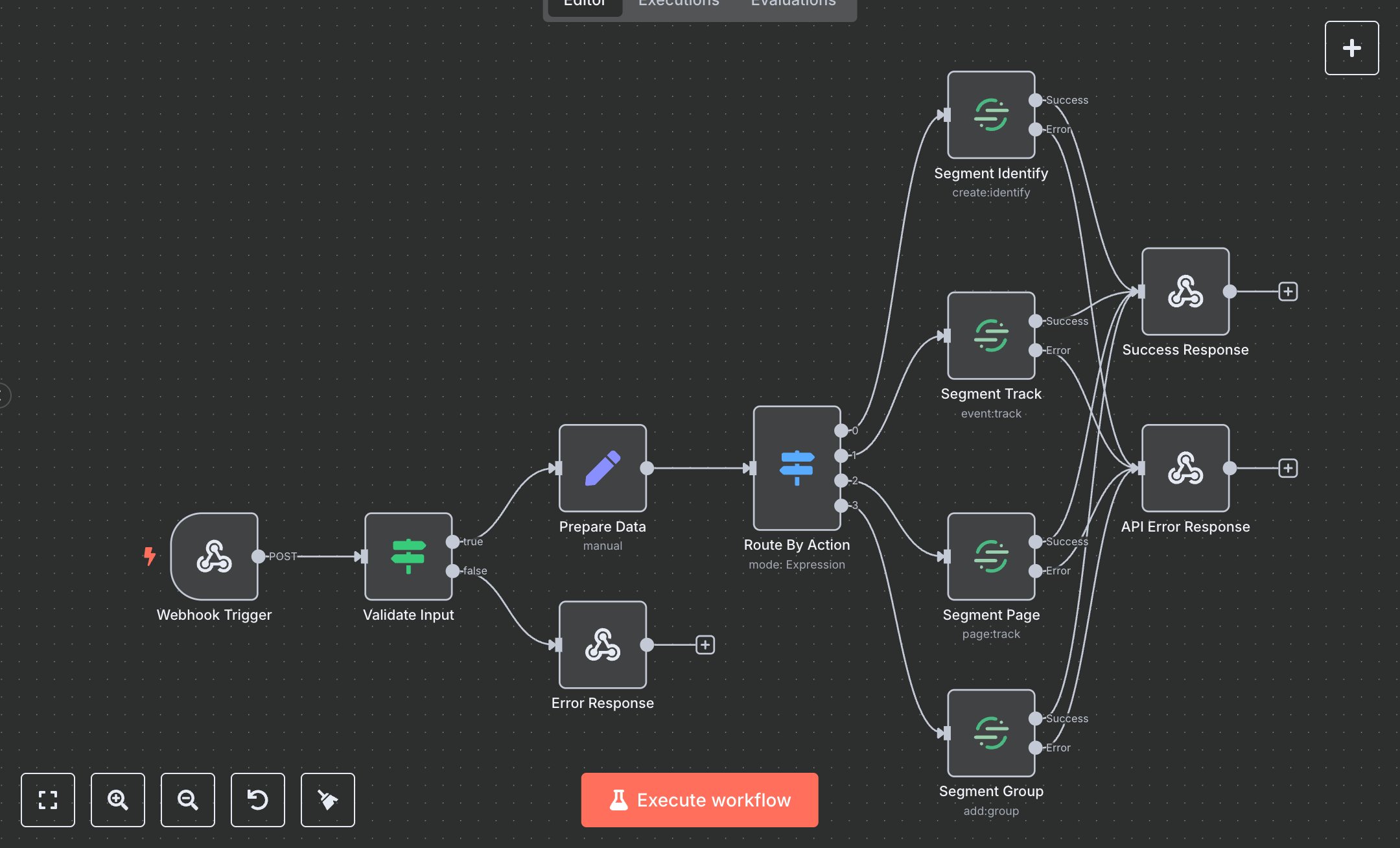
Segment: Track and Manage User Events
This n8n workflow automates tracking user events via the Segment API, supporting identify, track, page, and group actions. Key nodes include Webhook Trigger (initiates via POST), Validate Input (checks userId/action), Prepare Data (sets userId/action/traits/properties), Route By Action (directs to Segment Identify/Track/Page/Group), Segment Identify/Track/Page/Group (sends events to Segment), Success Response (returns results), and Error Response/API Error Response for handling failures.\n\nSetup Requirements and Configuration: Install n8n from n8n.io for self-hosting or sign up at cloud.n8n.io for cloud setup. Follow prompts or create a cloud account. Obtain a Segment Write Key from segment.com: log in, navigate to 'Sources,' select your source, go to 'Settings' > 'API Keys,' and copy the Write Key. In n8n, import the JSON workflow. Configure Segment nodes (Identify/Track/Page/Group) with the Write Key under ‘Credentials’ > ‘Segment API.’ Set Webhook Trigger path to ‘segment-tracker,’ configure for POST requests, and optionally add header authentication with a secure key (e.g., ‘Authorization: Bearer your-key’). Ensure server resources support API calls.\n\nTesting and Deployment Steps: Test with Postman using a POST request to the Webhook URL. Example JSON: {'body': {'userId': 'user123', 'action': 'identify', 'traits': {'type': 'user'}}} or {'body': {'userId': 'user123', 'action': 'track', 'properties': {'event': 'click'}}}. Success responses return 200 with userId, action, and timestamp. Error nodes return 400 for missing userId/action or 500 for API failures. Check logs for errors like ‘Invalid Write Key’ or ‘Event not sent,’ and verify the key or input format. Activate workflow in n8n. Validate output: ensure userId and action match inputs, and timestamp is valid. Debug errors using n8n logs for issues like rate limits, invalid traits/properties, or network problems.
$5.49
Workflow steps: 11
Integrated apps: webhook, if, respondToWebhook