Mindee API: Receipt and Invoice Automation
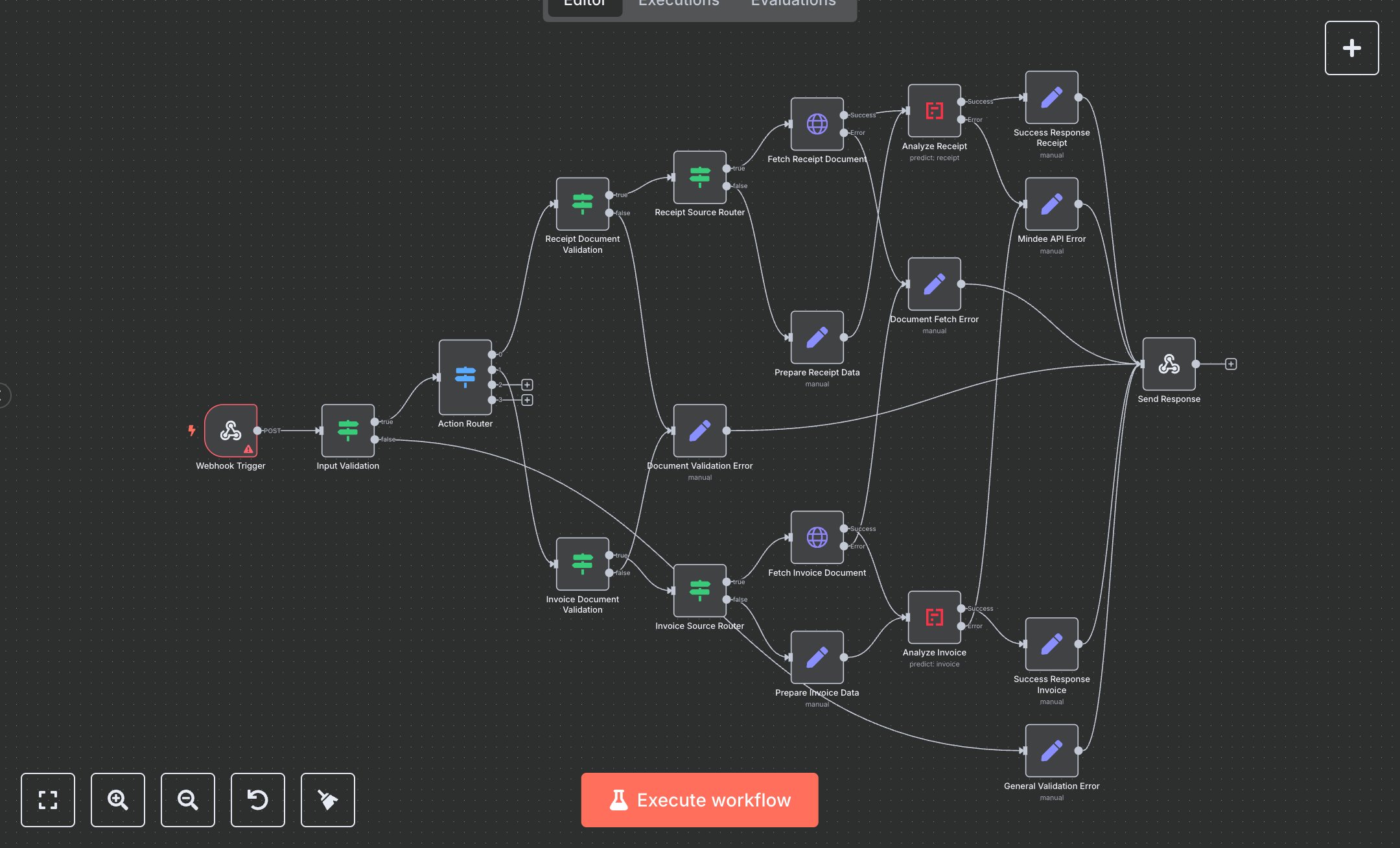
This workflow automates document analysis using the Mindee API, supporting receipt and invoice analysis. Key nodes include Webhook Trigger (initiates via POST), Input Validation (ensures valid action), Action Router (directs to receipt_analysis/invoice_analysis), Receipt/Invoice Document Validation (checks document source), Receipt/Invoice Source Router (handles URL/base64 data), Fetch Receipt/Invoice Document (retrieves document from URL), Prepare Receipt/Invoice Data (sets documentData), Analyze Receipt/Invoice (performs API analysis), Success Response Receipt/Invoice (returns results), and error nodes (General/Document Validation/Document Fetch/Mindee API Error) for handling failures.\n\nSetup Requirements and Configuration: Install n8n from n8n.io for self-hosting or sign up at cloud.n8n.io for cloud setup. Follow prompts or create a cloud account. Obtain Mindee API keys from platform.mindee.com: sign up, navigate to 'API Keys,' generate separate keys for Receipt and Invoice APIs, and copy them. In n8n, import the JSON workflow. Configure Analyze Receipt node with Receipt API key and Analyze Invoice node with Invoice API key under ‘Credentials’ > ‘Mindee Receipt API’ and ‘Mindee Invoice API.’ Set Webhook Trigger path to ‘mindee-automation,’ configure for POST requests, and add header authentication with a secure key (e.g., ‘Authorization: Bearer your-key’). Ensure server resources support API calls and file downloads.\n\nTesting and Deployment Steps: Test with Postman using a POST request to the Webhook URL. Example JSON: {'action': 'receipt_analysis', 'documentUrl': 'https://example.com/receipt.pdf'} or {'action': 'invoice_analysis', 'documentData': 'base64-encoded-data'} with an authentication header. Success responses return 200 with predictions, document details (filename, pages), and API status. Error nodes return 400 for invalid inputs (e.g., missing documentUrl/documentData) or 500 for API/fetch failures. Check logs for errors like ‘Invalid API key’ or ‘Document not found,’ and verify keys or input format. Activate workflow in n8n. Validate output: ensure predictions match document type and include filename/pages. Debug errors using n8n logs for key issues, invalid file formats, or network problems.
$6.99
Workflow steps: 20
Integrated apps: webhook, if, switch