LLM Context Aware Query Handling with Memory
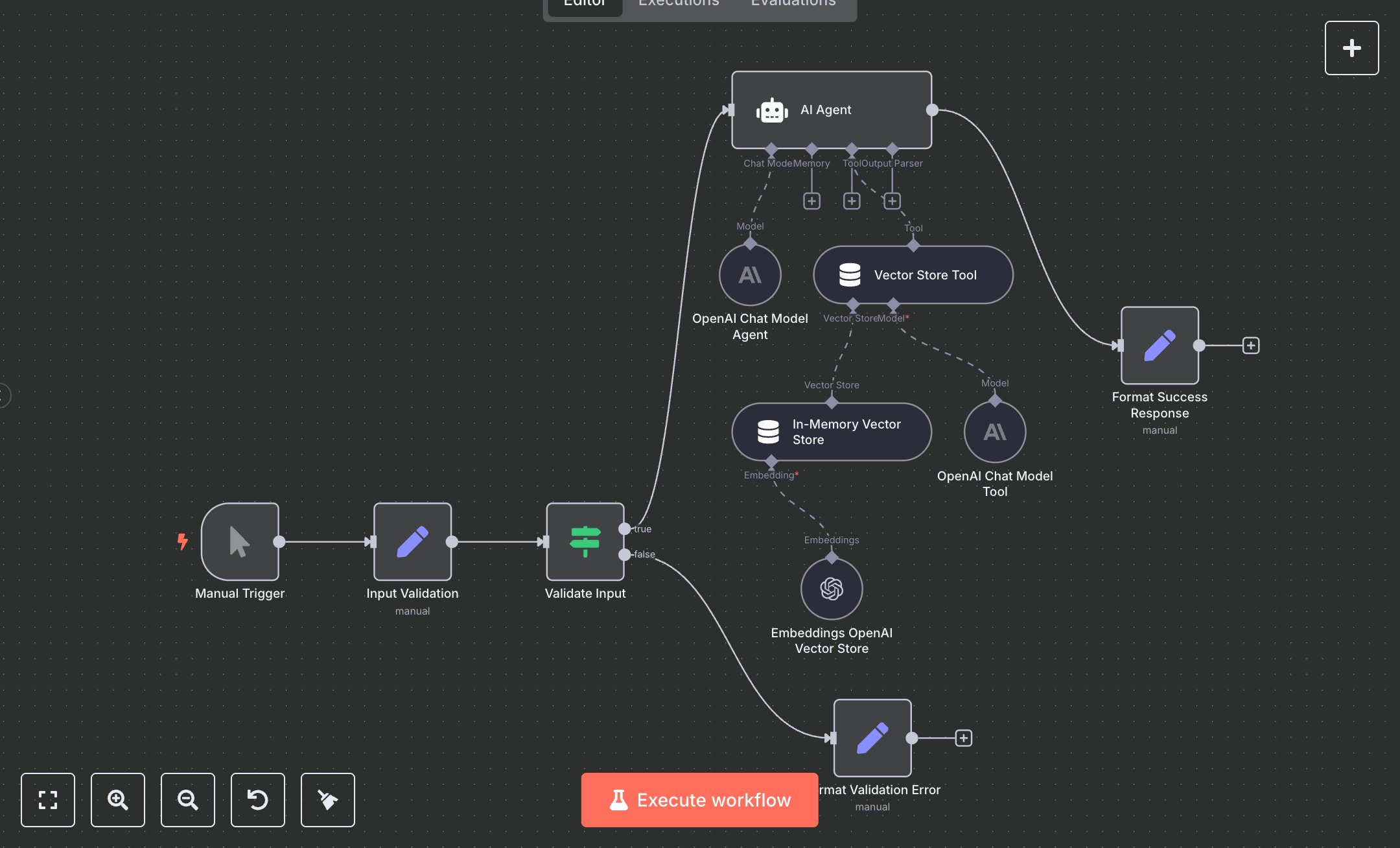
This workflow automates queries with historical context using OpenAI’s GPT-4o-mini and an in-memory vector store tool. Key nodes include Manual Trigger (initiates workflow), Input Validation (sets user_query, memory_key), Validate Input (ensures query length ≥3 characters), AI Agent (processes query), Vector Store Tool (retrieves past data), In-Memory Vector Store (stores data with memory_key), Embeddings OpenAI Vector Store (creates embeddings with text-embedding-3-small), OpenAI Chat Model Agent/Tool (handles AI processing), Format Success Response (returns response, memory_key_used, query_processed), and Format Validation Error (handles invalid inputs). It uses OpenAI’s API for language and embedding processing.\n\nSetup Requirements and Configuration: Install n8n from n8n.io for self-hosting or sign up at cloud.n8n.io for cloud setup. Follow installation prompts or create a cloud account. Obtain an OpenAI API key from platform.openai.com: sign up, go to ‘API Keys,’ and generate a key. In n8n, import the JSON workflow. Configure OpenAI Chat Model Agent, OpenAI Chat Model Tool, and Embeddings OpenAI Vector Store nodes with your API key under ‘Credentials’ > ‘OpenAI API.’ Replace Manual Trigger with a Webhook Trigger: set path to ‘vector-store-agent,’ configure for POST requests, and optionally add header authentication with a secure key. Ensure sufficient server resources for API calls and memory storage.\n\nTesting and Deployment Steps: Test via Postman with a POST request to the Webhook URL. Example JSON: {'user_query': 'Store: Meeting occurred yesterday.', 'memory_key': 'test_memory'} followed by {'user_query': 'What happened yesterday?', 'memory_key': 'test_memory'} with authentication header if set. Alternatively, use Manual Trigger. ‘Format Success Response’ returns a 200 status with response (e.g., ‘Meeting occurred yesterday’), memory_key_used, and query_processed, or ‘Format Validation Error’ (400 status) for queries shorter than 3 characters. Check logs for errors like ‘Invalid API key’ or ‘Vector store retrieval failed,’ and verify credentials or memory_key consistency. Activate workflow in n8n. Validate output to ensure response reflects stored data and memory_key_used matches input.
$6.99
Workflow steps: 11
Integrated apps: manualTrigger, set, if