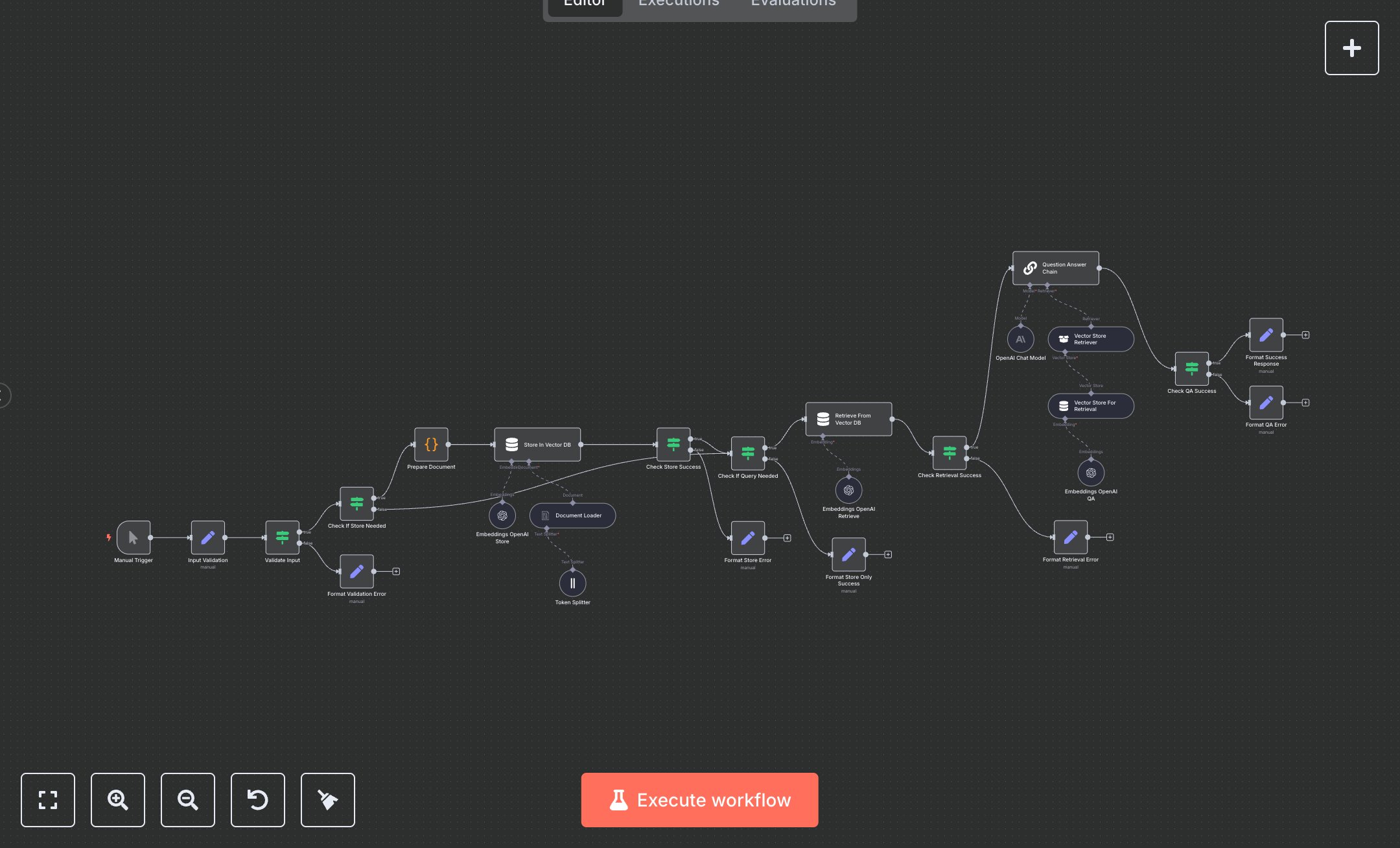
LLM Powered RAG Workflow with Document Query and Storage
This workflow automates document storage and retrieval using OpenAI’s GPT-3.5-turbo-0125 and text-embedding-3-small for Retrieval-Augmented Generation (RAG). Key nodes include Manual Trigger (initiates workflow), Input Validation (sets operation, query, document_text), Validate Input (checks operation and query length), Check If Store Needed, Prepare Document (loads text), Store In Vector DB (saves embeddings), Check Store Success, Check If Query Needed, Retrieve From Vector DB, Question Answer Chain (processes query), Document Loader, Token Splitter, Embeddings OpenAI (Store/Retrieve/QA), Vector Store Retriever, Check QA Success, Format Success Response, and error nodes (Format Validation/Store/Retrieval/QA Error). It uses OpenAI’s API for embeddings and chat.\n\nSetup Requirements and Configuration: Install n8n by downloading from n8n.io for self-hosting or sign up at cloud.n8n.io for cloud setup. Follow installation prompts or create a cloud account. Obtain an OpenAI API key from platform.openai.com: sign up, navigate to ‘API Keys,’ and generate a key. In n8n, import the JSON to create the workflow. Configure Embeddings OpenAI Store, Retrieve, QA, and OpenAI Chat Model nodes by adding your API key under ‘Credentials’ > ‘OpenAI API.’ Replace Manual Trigger with a Webhook Trigger: set path to ‘vector-store-rag,’ configure for POST requests, and optionally add header authentication with a secure key. Ensure sufficient server resources for vector storage and API calls.\n\nTesting and Deployment Steps: Test via Postman with a POST request to the Webhook URL (post-Manual Trigger replacement). Example JSON: {'operation': 'store_and_query', 'query': 'What is the size of a block header?', 'document': 'Bitcoin: A Peer-to-Peer...block header with no transactions would be about 80 bytes...'} with an authentication header if set. Alternatively, use Manual Trigger. The ‘Format Success Response’ node returns a 200 status with answer, operation_performed, and documents_retrieved, or error nodes (400 for invalid inputs, 404 for retrieval failure, 500 for store/QA errors) for issues like ‘Invalid API key’ or ‘Empty query.’ Check logs, verify credentials, and input format. Activate workflow in n8n for deployment. Validate answer aligns with query and documents_retrieved is ‘Yes.
$6.99
Workflow steps: 26
Integrated apps: manualTrigger, set, if