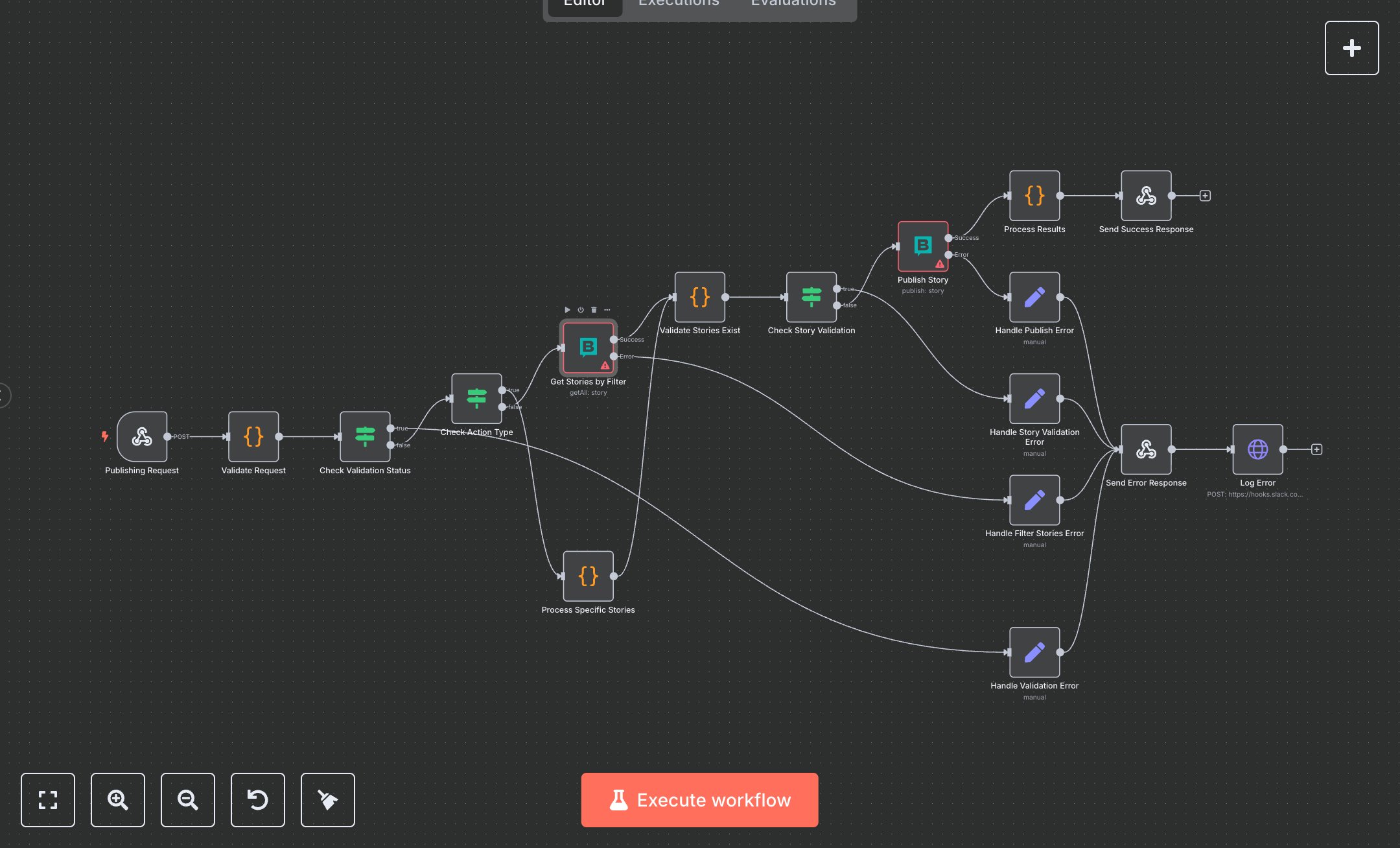
Storyblok Content Publishing Service workflow
This workflow automates Storyblok content publishing via webhook, validates requests, fetches or processes stories, and logs results to Slack. Key nodes include Publishing Request (webhook trigger), Validate Request (checks input data), Check Action Type (routes by action), Get Stories by Filter (fetches stories), Process Specific Stories (handles specific IDs), Publish Story (publishes to Storyblok), Send Success Response (returns success), Send Error Response (handles errors), and Log Error (notifies Slack). It uses Storyblok and Slack APIs.\n\nSetup Requirements: Install n8n from n8n.io or sign up at cloud.n8n.io. Import the JSON into n8n’s workflow editor. Get Storyblok Management API token from storyblok.com (App > Settings > API Keys). Create a Slack Webhook URL at slack.com (Apps > Incoming Webhooks, create in #content-alerts). In n8n, configure credentials: Storyblok (API Token), Slack (Webhook URL). Update Publishing Request’s webhook path in n8n (e.g., storyblok-publish). Configure your CMS to send POST requests to n8n’s webhook URL (displayed in Publishing Request node). Handle errors like missing space_id (400: Missing space_id) or invalid API token (401: Unauthorized). Replace https://hooks.slack.com/services/YOUR/SLACK/WEBHOOK in Log Error with your Slack Webhook URL.\n\nTesting and Deployment: Import the JSON into n8n. Send a test POST request to the webhook URL with JSON: {\"space_id\": \"your_space_id\", \"action\": \"specific\", \"story_ids\": [\"123\"]}, or {\"space_id\": \"your_space_id\", \"action\": \"filter\", \"filter_prefix\": \"release\"}. Verify Validate Request extracts space_id and action_type. Confirm Check Action Type routes correctly, Get Stories by Filter retrieves stories, or Process Specific Stories processes IDs. Check Publish Story publishes content, and Send Success Response returns status. Test with an invalid space_id to trigger Send Error Response (400). Monitor Slack for error logs (500: Storyblok publish error). If publishing fails, verify the Storyblok token and space ID. Check for rate limits (429). Activate the workflow in n8n and ensure the CMS webhook is live. Deploy for automated content publishing and error notifications.
$6.99
Workflow steps: 17
Integrated apps: webhook, code, if