LLM Agent Plan and Execute Query Processing Workflow
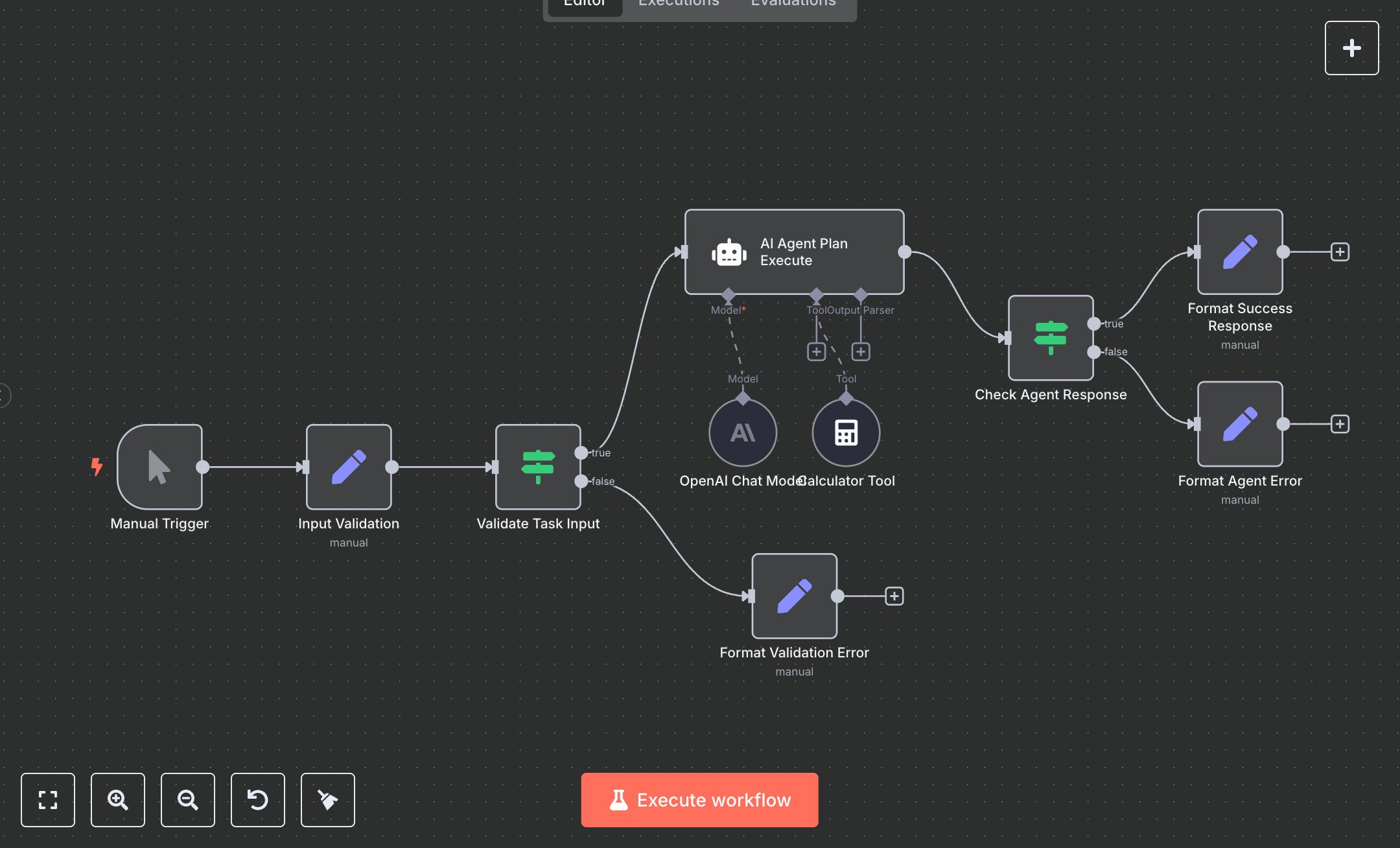
This workflow automates task processing using OpenAI’s GPT-4-turbo-preview model with a planning and execution agent. Key nodes include Manual Trigger (initiates workflow), Input Validation (sets and validates task), Validate Task Input (ensures task length ≥5 characters), AI Agent Plan Execute (API interaction with planning agent), OpenAI Chat Model (configures model), Calculator Tool (supports calculations), Check Agent Response (verifies output), Format Success Response, Format Agent Error, and Format Validation Error (manage outputs). It uses OpenAI’s API for task execution.\n\nSetup Requirements and Configuration: Install n8n by downloading from n8n.io for self-hosting or sign up at cloud.n8n.io for cloud setup. Follow installation prompts or create a cloud account. Obtain an OpenAI API key from platform.openai.com: sign up, navigate to ‘API Keys’ in your account, and generate a key. In n8n, import the provided JSON to create the workflow. Configure the OpenAI Chat Model node by adding your API key under ‘Credentials’ > ‘OpenAI API’ in n8n’s interface. Replace the Manual Trigger with a Webhook Trigger for automation: set its path to ‘agent-execute,’ ensure it accepts POST requests, and optionally enable header authentication with a secure key. Ensure sufficient server resources for cloud or self-hosted setups to handle API requests and calculations.\n\nTesting and Deployment Steps: Test by sending a POST request to the Webhook URL (after replacing Manual Trigger) using Postman. Example JSON body: {'task': 'What is 30 + (10002200 / 100)?'} with the authentication header if enabled. Alternatively, use the Manual Trigger in n8n’s editor. The ‘Format Success Response’ node returns a 200 status with result, model_used (gpt-4-turbo-preview), and task_processed, or ‘Format Validation Error’ (400 status) for short/empty tasks, or ‘Format Agent Error’ (500 status) for API issues like invalid credentials. Monitor logs for errors like ‘Invalid API key’ or ‘Agent execution failed,’ and verify credentials or task format if issues occur. Activate the workflow in n8n’s interface for deployment. Validate outputs to confirm result matches the task and agent_type is ‘plan_and_execute.
$6.99
Workflow steps: 10
Integrated apps: manualTrigger, set, if