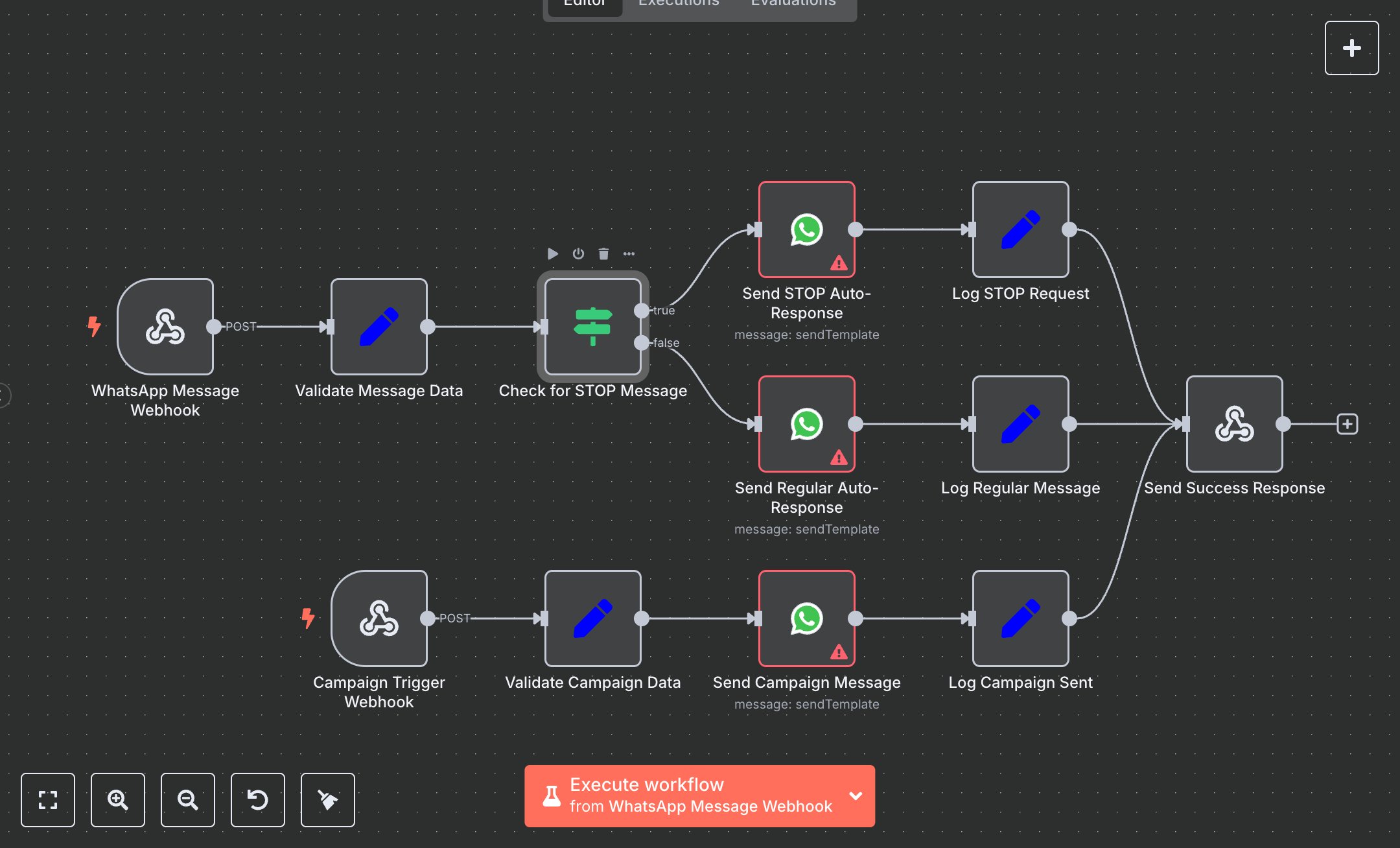
WhatsApp Business: Message Handling, Campaigns, and Auto Responses
This workflow automates WhatsApp Business messaging using the WhatsApp Business API. Key nodes include WhatsApp Message Webhook (receives messages), Validate Message Data (extracts message details), Check for STOP Message (detects unsubscribe requests), Send STOP Auto-Response/Send Regular Auto-Response (sends replies), Campaign Trigger Webhook (initiates campaigns), Validate Campaign Data (processes campaign inputs), Send Campaign Message (sends offers), and Send Success Response (returns results).\n\nSetup Requirements: Install n8n from n8n.io for local setup or sign up at cloud.n8n.io. Create two Webhook nodes: WhatsApp Message Webhook (path: whatsapp-message) and Campaign Trigger Webhook (path: campaign-webhook), both set to POST. Register the WhatsApp Message Webhook URL in the WhatsApp Business Platform (Meta for Developers > WhatsApp > Webhooks). Obtain WhatsApp Business API credentials (Phone Number ID and Access Token) from the Meta for Developers portal. In n8n’s Credentials, add WhatsApp API with the token and update Send STOP Auto-Response, Send Regular Auto-Response, and Send Campaign Message with your Phone Number ID. Ensure Validate Message Data extracts message_text and sender_phone. If message_text starts with “stop”, Send STOP Auto-Response triggers. Handle errors like invalid tokens (401) or missing phone fields. Connect nodes in the editor.\n\nTesting and Deployment: Import the JSON into n8n’s workflow editor. Test the message webhook with curl -X POST http://your-n8n-instance/whatsapp-message -d '{"message":"Hello","from":"1234567890","name":"Test"}'. Verify Send Success Response outputs status: "success", action, and phone. Test the campaign webhook with curl -X POST http://your-n8n-instance/campaign-webhook -d '{"phone":"1234567890", "name":"Test","offer":"Special Deal"}'. Check logs for campaign_sent or unsubscribe_request. Handle errors like missing Phone Number ID (400). Activate the workflow in n8n, integrate webhooks with your app, and monitor logs for issues like rate limits or invalid inputs, ensuring reliable messaging and campaign execution.
$5.49
Workflow steps: 12
Integrated apps: webhook, set, if