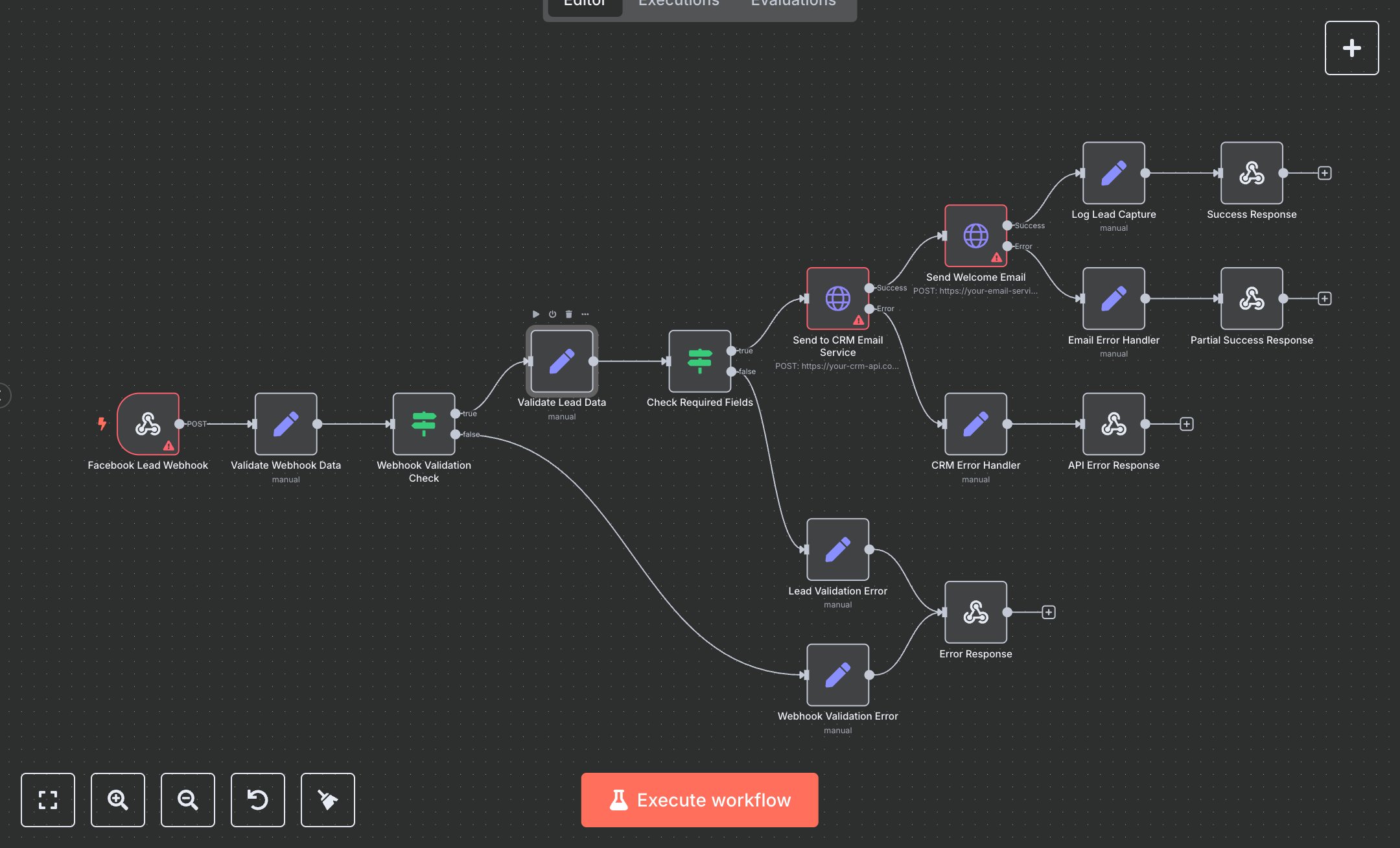
Facebook Lead Processing Automation
This workflow processes Facebook lead ad submissions, sending data to a CRM and emailing leads. Key nodes include Facebook Lead Webhook (receives lead data), Validate Webhook Data (checks payload), Webhook Validation Check (ensures valid input), Validate Lead Data (extracts/formats lead info), Check Required Fields (verifies email/name), Send to CRM Email Service (posts to CRM API), Send Welcome Email (sends email via API), Log Lead Capture (records results), Success Response (returns success), Webhook Validation Error (handles invalid payload), Lead Validation Error (handles invalid lead data), CRM Error Handler (handles CRM API errors), Email Error Handler (handles email API errors), Error Response (returns validation errors), API Error Response (returns API errors), Partial Success Response (handles email failure). It uses Facebook, CRM, and email service APIs.\n\nSetup Requirements: Install n8n from n8n.io or sign up at cloud.n8n.io. Import the JSON into n8n’s workflow editor. Create a Facebook app at developers.facebook.com (Apps > Create App), set up a lead ad webhook, and get an access token. Obtain CRM API credentials (e.g., API key from your CRM dashboard). Set up an email service (e.g., SendGrid) and get API credentials at sendgrid.com. Configure n8n credentials: headerAuth for webhook (Bearer YOUR_TOKEN), CRM (httpHeaderAuth), email service (httpHeaderAuth). In Facebook, add n8n’s webhook URL (from Facebook Lead Webhook node) for lead ad events. Set Webhook Trigger path to your-webhook-path. Handle errors like missing payload (400: WEBHOOK_VALIDATION_ERROR) or invalid CRM credentials (500: CRM_API_ERROR).\n\nTesting and Deployment: Import the JSON into n8n. Test by simulating a Facebook lead ad webhook event via Facebook’s test tool or a POST request with JSON: {\"email\": \"user@example.com\", \"full_name\": \"John Doe\", \"course\": \"Python\"} and valid auth header. Verify Send to CRM Email Service and Send Welcome Email execute, and Success Response returns status 200 with lead_data. Test with an invalid email (400: LEAD_VALIDATION_ERROR) or incorrect CRM credentials (500: CRM_API_ERROR). Test email failure (207: Partial Success). Monitor for rate limits (429: Too Many Requests). If CRM fails, verify the API URL/credentials. Activate the workflow and ensure the webhook is live. Deploy for reliable lead processing.
$5.49
Workflow steps: 16
Integrated apps: webhook, set, if