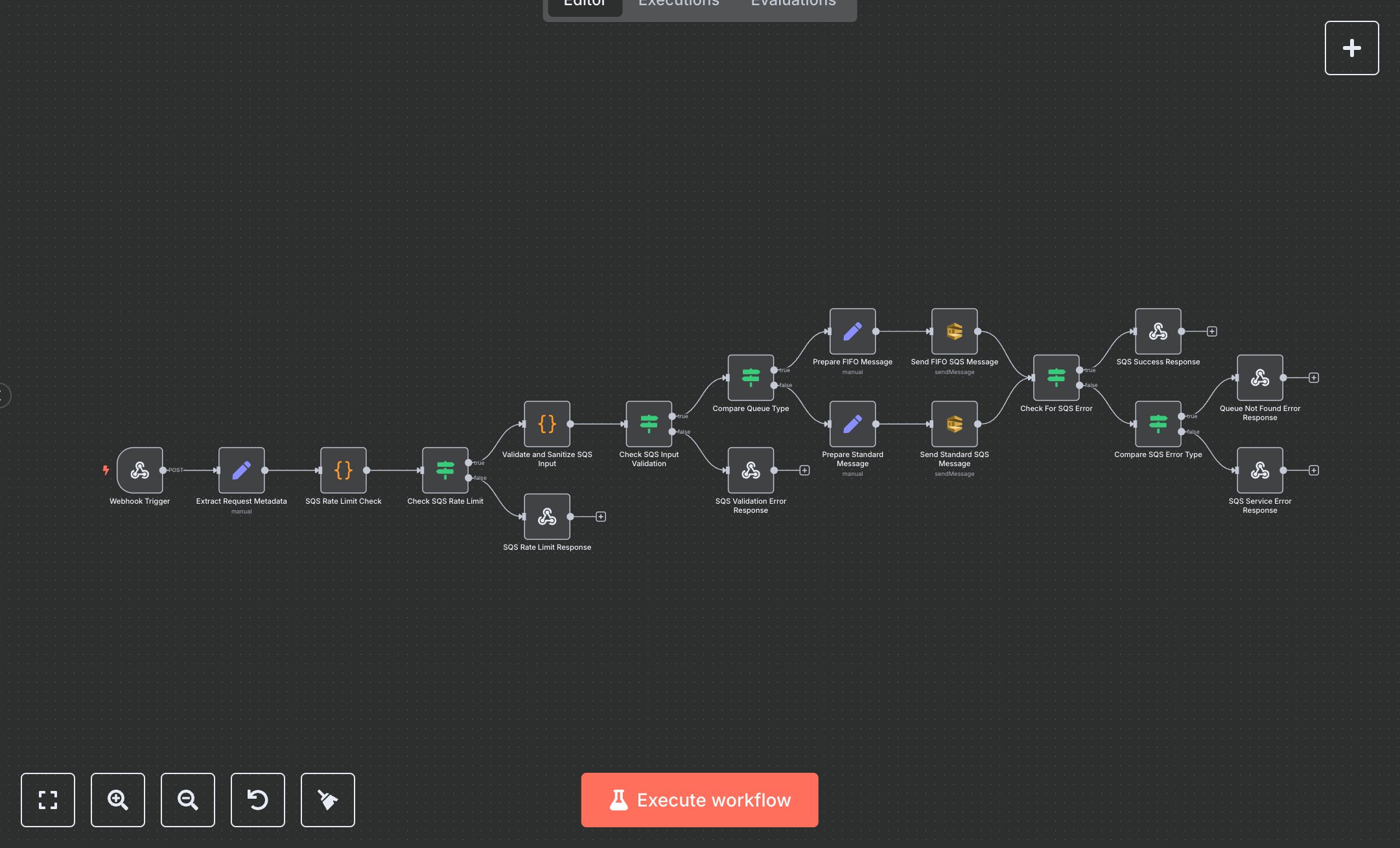
AWS SQS Send Message Automation
This n8n workflow automates sending messages to AWS SQS queues, supporting both standard and FIFO queues with rate limiting. Key nodes include Webhook Trigger (receives POST requests), Extract Request Metadata (captures client data), SQS Rate Limit Check, Validate and Sanitize SQS Input, Prepare FIFO/Standard Message (data processing), Send FIFO/Standard SQS Message (API interaction), and Success/Error Response nodes (handle outputs). Set up Requirements and Configuration: Install n8n by downloading from n8n.io for self-hosting or sign up at cloud.n8n.io for cloud setup. Follow installation prompts or create a cloud account. Obtain AWS credentials from aws.amazon.com: log in, go to 'IAM' > 'Users,' create a user with SQSSendMessage permissions, and note the Access Key ID and Secret Access Key. Create an SQS queue in the AWS Console under 'SQS' > 'Create Queue,' and note the Queue URL. In n8n, import the provided JSON to create the workflow. Configure 'Send FIFO SQS Message' and 'Send Standard SQS Message' nodes with your AWS credentials under 'Credentials,' selecting 'AWS.' Set the Webhook Trigger node’s path to 'sqs/send-message,' enable header authentication with a secure key, and ensure it accepts POST requests. The Validate and Sanitize SQS Input node checks the queue URL, message, and FIFO-specific fields. Testing and Deployment Steps: Test by sending a POST request to the Webhook URL (from the Webhook Trigger node) using Postman. Example JSON body: {'queueUrl': 'https://sqs.us-east-1.amazonaws.com/123456789012/MyQueue', 'message': 'Test message', 'priority': 'normal', 'messageGroupId': 'group1'} with the authentication header. The 'SQS Success Response' node returns a 200 status with message details, or 'SQS Validation Error Response' (400 status) for invalid inputs. The 'SQS Rate Limit Response' (429 status) triggers if exceeding 50 requests per minute. The 'Queue Not Found Error Response' (404 status) indicates an invalid queue URL. Activate the workflow in n8n’s interface for deployment. Monitor logs for errors like invalid credentials or queue issues, and verify AWS permissions or inputs if problems occur.
$6.99
Workflow steps: 18
Integrated apps: webhook, set, code