Tapfiliate Affiliate Management Workflow
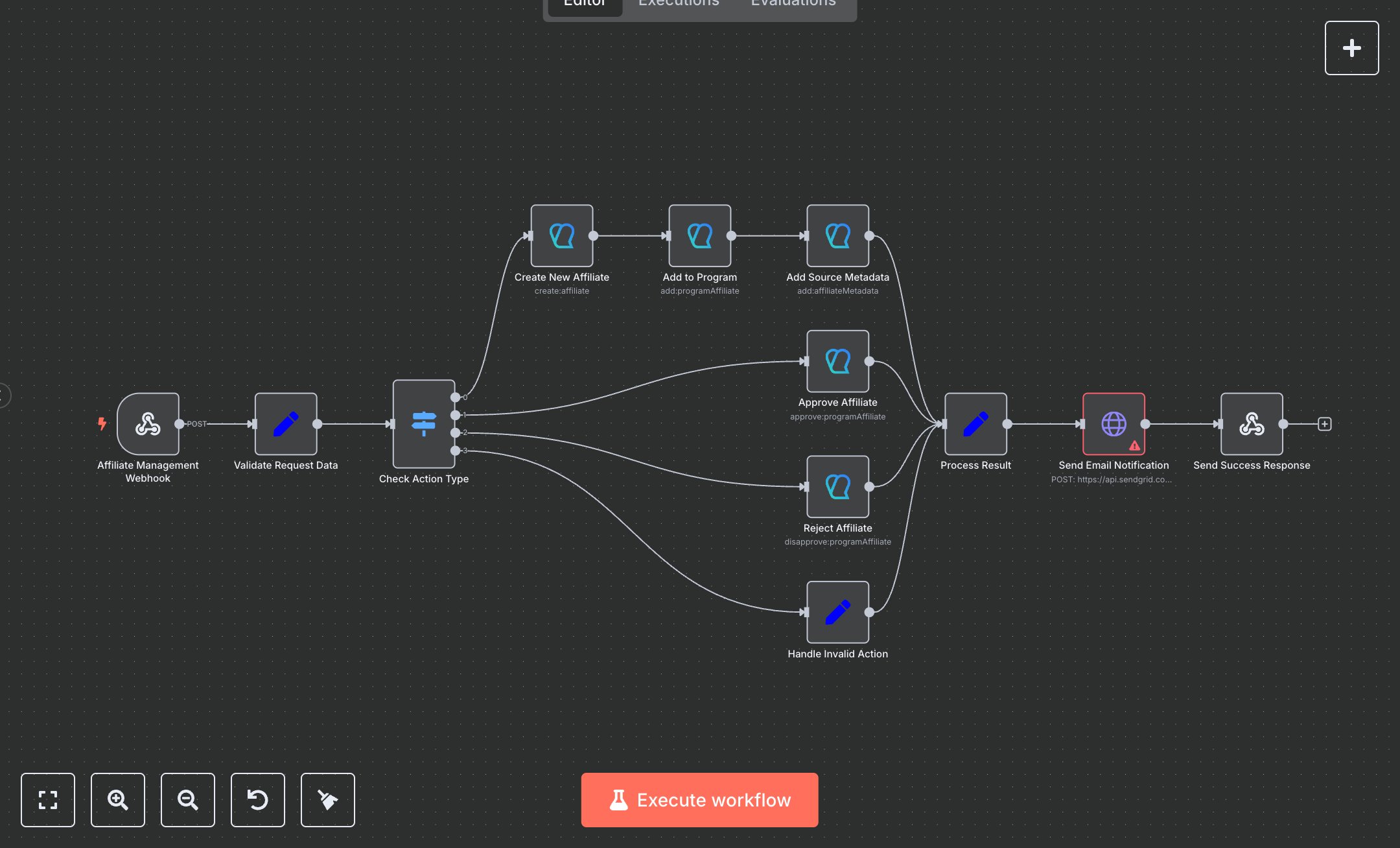
This workflow automates affiliate management using the Tapfiliate API. Key nodes include Affiliate Management Webhook (receives POST requests), Validate Request Data (extracts/formats data), Check Action Type (routes create/approve/reject actions), Create New Affiliate/Add to Program/Add Source Metadata (manages affiliates), Approve Affiliate/Reject Affiliate (updates status), Send Email Notification (sends confirmation), and Send Success Response (returns results).\n\nSetup Requirements: Install n8n from n8n.io for local setup or sign up at cloud.n8n.io. Create a Webhook node (Affiliate Management Webhook) with a unique path (e.g., tapfiliate-webhook) and HTTP method POST. Obtain a Tapfiliate API key from your Tapfiliate dashboard (Settings > API). In n8n’s Credentials, add Tapfiliate API and input the key. Configure Create New Affiliate, Add to Program, Approve Affiliate, Reject Affiliate, and Add Source Metadata nodes with the Tapfiliate API credential. For email notifications, get a SendGrid API key from sendgrid.com and add it as SendGrid API in n8n’s Credentials. Update the Send Email Notification node with https://api.sendgrid.com/v3/mail/send and your template ID. If action is invalid, Handle Invalid Action sets an error. Connect nodes in the editor.\n\nTesting and Deployment: Import the JSON into n8n’s workflow editor. Test with a POST request: curl -X POST http://your-n8n-instance/tapfiliate-webhook -d '{"action":"create","email":"test@example.com","first_name":"John","last_name":"Doe","program_id":"123"}'. Verify Send Success Response outputs status: "success", affiliate_id, and email. Check for errors like missing API keys (401) or invalid actions (status: "failed"). Activate the workflow in n8n and integrate the webhook URL into your app. Monitor logs for issues like missing email or incorrect program_id, ensuring robust affiliate management and notifications.
$6.99
Workflow steps: 12
Integrated apps: webhook, set, switch