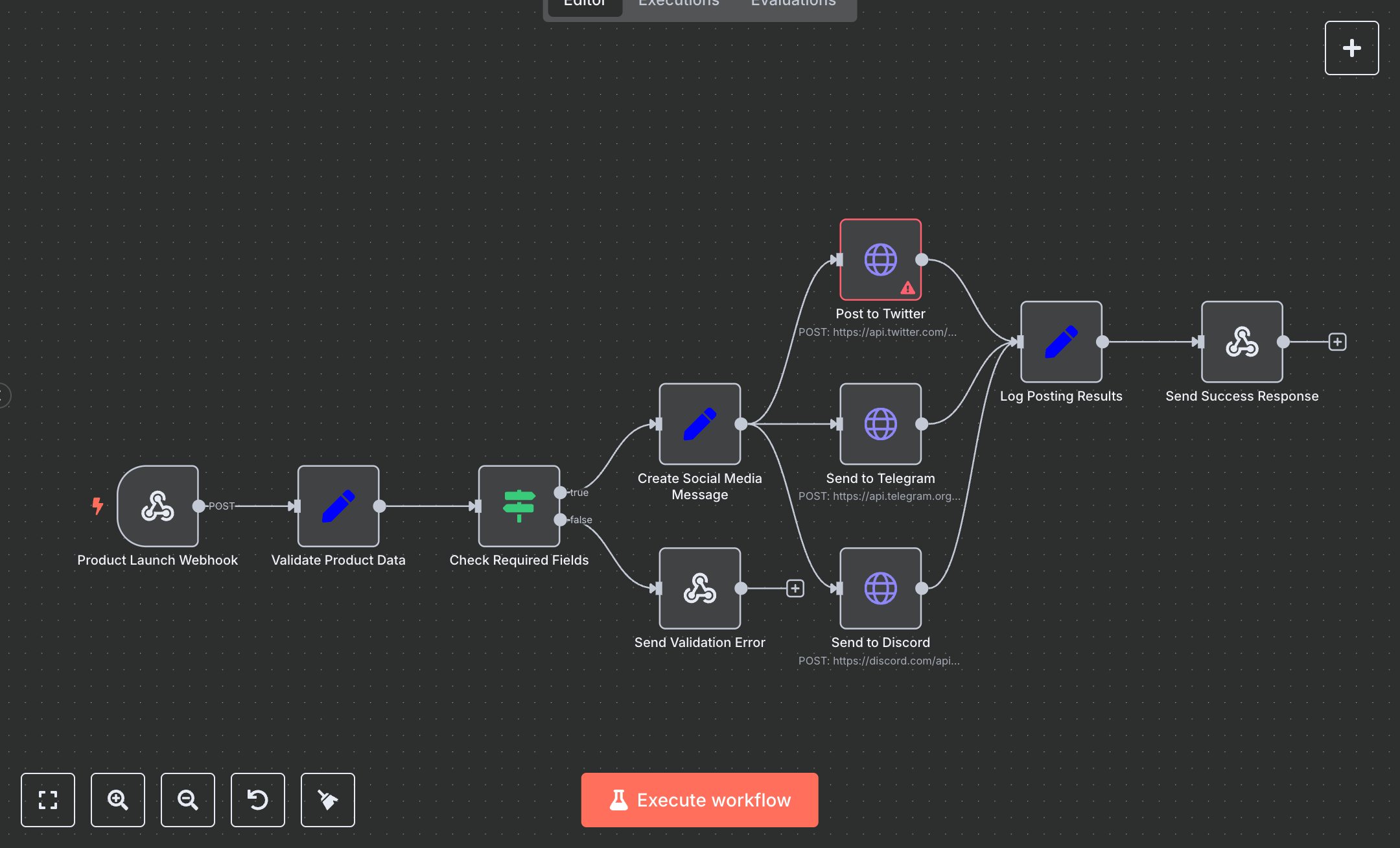
Product Launch Social Media Automation Workflow
This workflow automates product launch announcements on Twitter, Telegram, and Discord using their respective APIs in n8n. Key nodes include Product Launch Webhook for receiving POST requests, Validate Product Data to extract inputs, Check Required Fields for validation, Create Social Media Message for crafting posts, Post to Twitter, Send to Telegram, and Send to Discord for API interactions, and Log Posting Results for output formatting. Setup Requirements: Install n8n by downloading from n8n.io or sign up at cloud.n8n.io. For Twitter, create a developer account at developer.x.com, generate OAuth 2.0 credentials, and add them in n8n under Credentials > Twitter OAuth2 API ('twitterOAuth2Api'). For Telegram, create a bot via BotFather, get a token, and add it as 'telegramApi'. For Discord, create a webhook in your server settings and note the URL. Configure the Product Launch Webhook node with a unique path (e.g., 'launch-webhook'). Ensure API nodes reference correct credentials and URLs. Missing credentials trigger authentication errors; verify keys. Missing product_title returns an 'Invalid product data' error with a 400 status code. Testing and Deployment: Import the JSON into n8n’s workflow editor. Test the webhook with a POST request (e.g., curl -X POST http://your-n8n-instance/launch-webhook -d '{"title":"New Gadget","product_url":"https://example.com"}'). Validate outputs in Log Posting Results, checking twitter_status, telegram_status, and discord_status for 'success'. Ensure posts appear on all platforms. Handle errors like invalid URLs or missing titles, which return 'failed' statuses. Deploy by activating the workflow in n8n and integrating the webhook URL into your application. Monitor logs for issues like failed API calls or invalid inputs to ensure reliable social media posting and robust error handling.
$5.49
Workflow steps: 10
Integrated apps: webhook, set, if