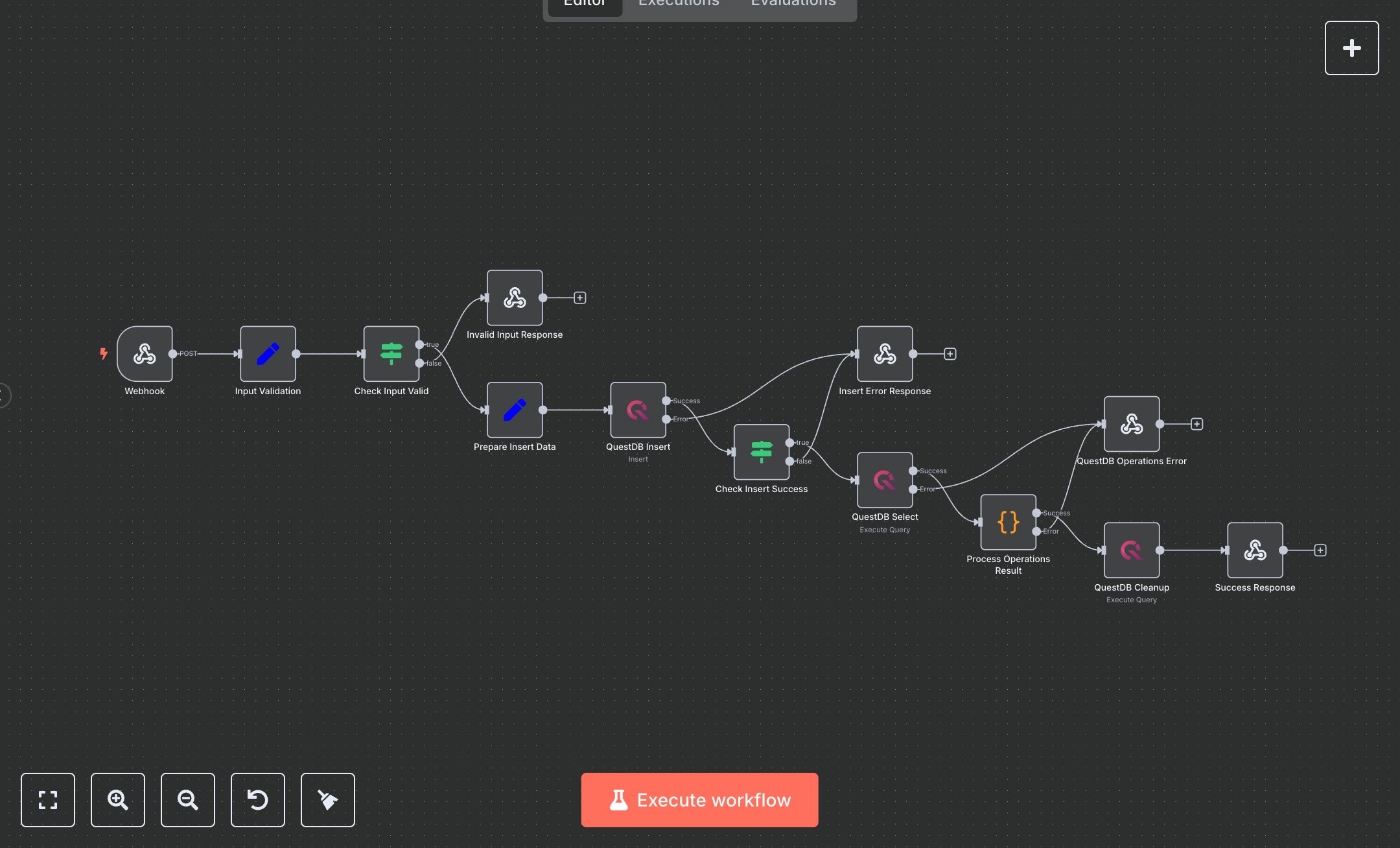
QuestDB Time Series Operations
This workflow automates QuestDB time-series operations via a webhook, performing insert, query, and cleanup actions. Key nodes include Webhook (receives POST requests), Input Validation (sanitizes inputs), Check Input Valid (verifies operation), Prepare Insert Data (formats records), QuestDB Insert/Select/Cleanup (executes queries), Check Insert Success (confirms insertion), Process Operations Result (summarizes output), Success Response (returns JSON), and error responses (Invalid Input, Insert Error, QuestDB Operations). It uses the QuestDB service. Setup Requirements Install n8n from n8n.io or sign up at cloud.n8n.io. Import the JSON into n8n’s workflow editor. Install QuestDB locally or use a cloud instance (e.g., QuestDB Cloud). Obtain QuestDB credentials (host, port, username, password) from your instance or provider’s dashboard. In n8n, configure questDb credentials under questdb-credentials with the host (e.g., localhost), port (default 9000), username, and password. Configure the Webhook node by copying its URL (/questdb-operations). Set allowedOrigins (e.g., 'https://your-domain.com') for security. The workflow expects a JSON payload with 'operation' (e.g., test_insert_query), 'tableName', 'name', 'id', and 'query'. Handle errors like invalid operation (400: Invalid operation) or connection failure (502: Failed to insert). Secure credentials and webhook URL. Testing and Deployment Import the JSON into n8n and activate the workflow. Ensure QuestDB is running and credentials are configured. Test the Webhook with a POST request (e.g., curl -X POST [webhook-url] -d '{"operation": "test_insert_query", "tableName": "testtable", "name": "TestRecord"}' -H 'Content-Type: application/json'). Verify QuestDB Insert adds records, Select retrieves them, Cleanup removes them, and Success Response returns JSON with operation summaries. Test error cases: invalid operation (400: Invalid operation), wrong credentials (502: Failed to connect), or non-existent table (502: QuestDB operations failed). Check n8n and QuestDB logs for errors. Integrate the webhook URL into your application, ensure QuestDB accessibility, activate the workflow, and deploy for automated time-series operations. Monitor QuestDB connection stability and query performance.
$6.99
Workflow steps: 13
Integrated apps: webhook, set, if