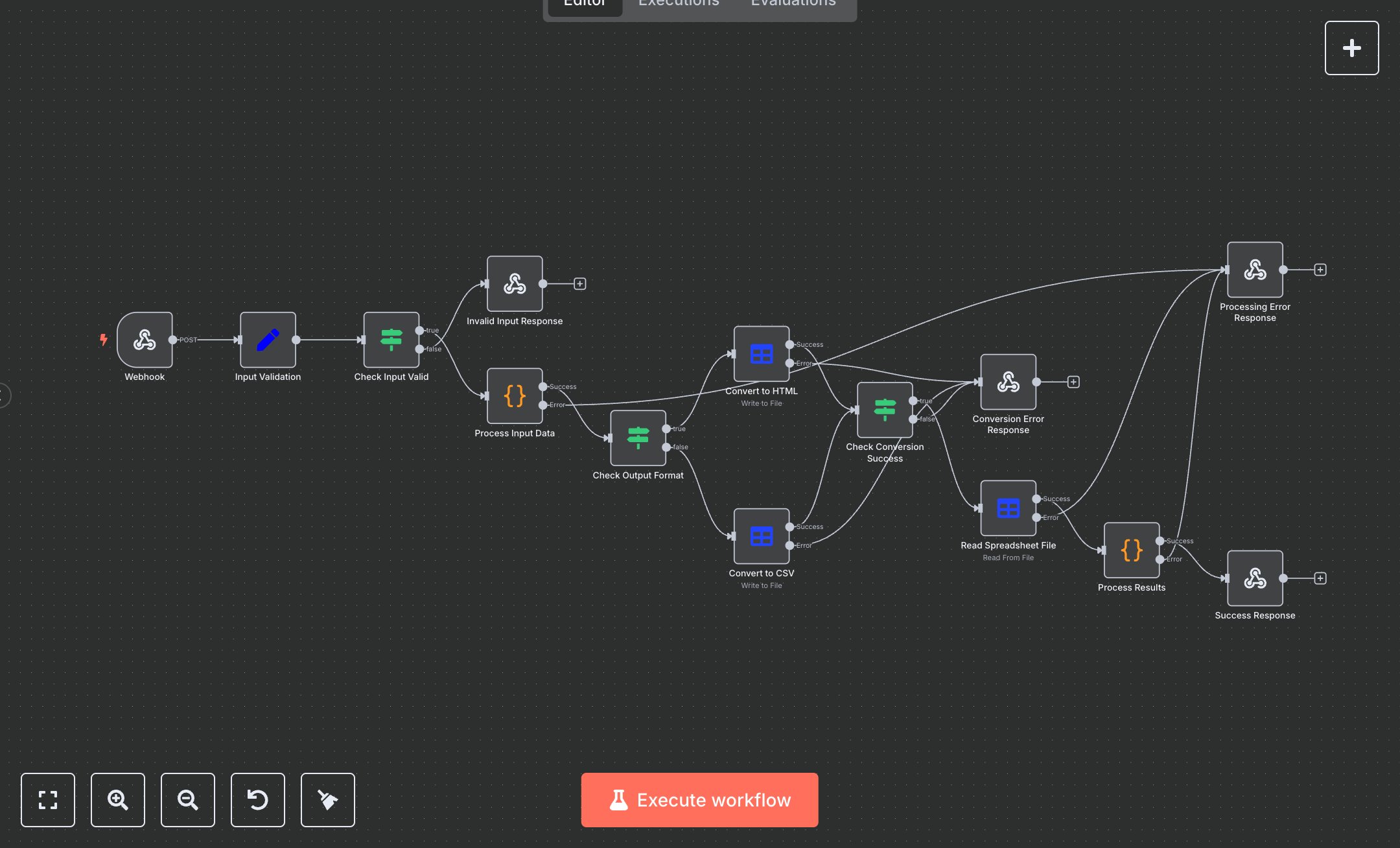
Spreadsheet Operations Service
This workflow converts spreadsheet data to HTML or CSV via a webhook. Key nodes include Webhook (receives POST requests), Input Validation (checks operation and data), Check Input Valid (verifies inputs), Process Input Data (handles input or generates test data), Check Output Format (routes to format), Convert to HTML/CSV (performs conversion), Check Conversion Success (ensures output), Read Spreadsheet File (validates data), Process Results (summarizes output), Success Response (returns JSON), and error responses (Invalid Input, Conversion Error, Processing Error). No external APIs are used, relying on n8n’s spreadsheetFile node. Setup Requirements Install n8n from n8n.io or sign up at cloud.n8n.io. Import the JSON into n8n’s workflow editor. No API credentials are needed, as it uses n8n’s built-in nodes. Configure the Webhook node by copying its URL (/spreadsheet-operations) from the n8n interface. Set allowedOrigins (e.g., 'https://your-domain.com') for security. The workflow expects a JSON payload with 'operation' (e.g., convert_to_html, test_operations), 'outputFormat' (html/csv), and 'data' (array of objects). Handle errors like invalid operation or empty data (400: Invalid input), conversion failures (500: Spreadsheet conversion failed), or processing errors (500: Spreadsheet processing failed). Ensure the n8n server has sufficient memory for large datasets. Secure the webhook URL to prevent unauthorized access. Testing and Deployment Import the JSON into n8n and activate the workflow. Test the Webhook with a POST request (e.g., curl -X POST [webhook-url] -d '{"operation": "test_operations", "outputFormat": "html"}' -H 'Content-Type: application/json'). Verify Process Input Data generates test data, Convert to HTML/CSV produces output JSON with file details, and Success Response returns JSON. Test error cases: send an invalid operation (400: invalid operation), an empty data array ([]), or unsupported format (500: spreadsheet conversion error). Check n8n logs for errors. Integrate the webhook URL into your application, activate the workflow, and deploy for automated spreadsheet conversions. Ensure sufficient memory for large datasets and monitor performance.
$5.49
Workflow steps: 14
Integrated apps: webhook, set, if