Read Binary File Service
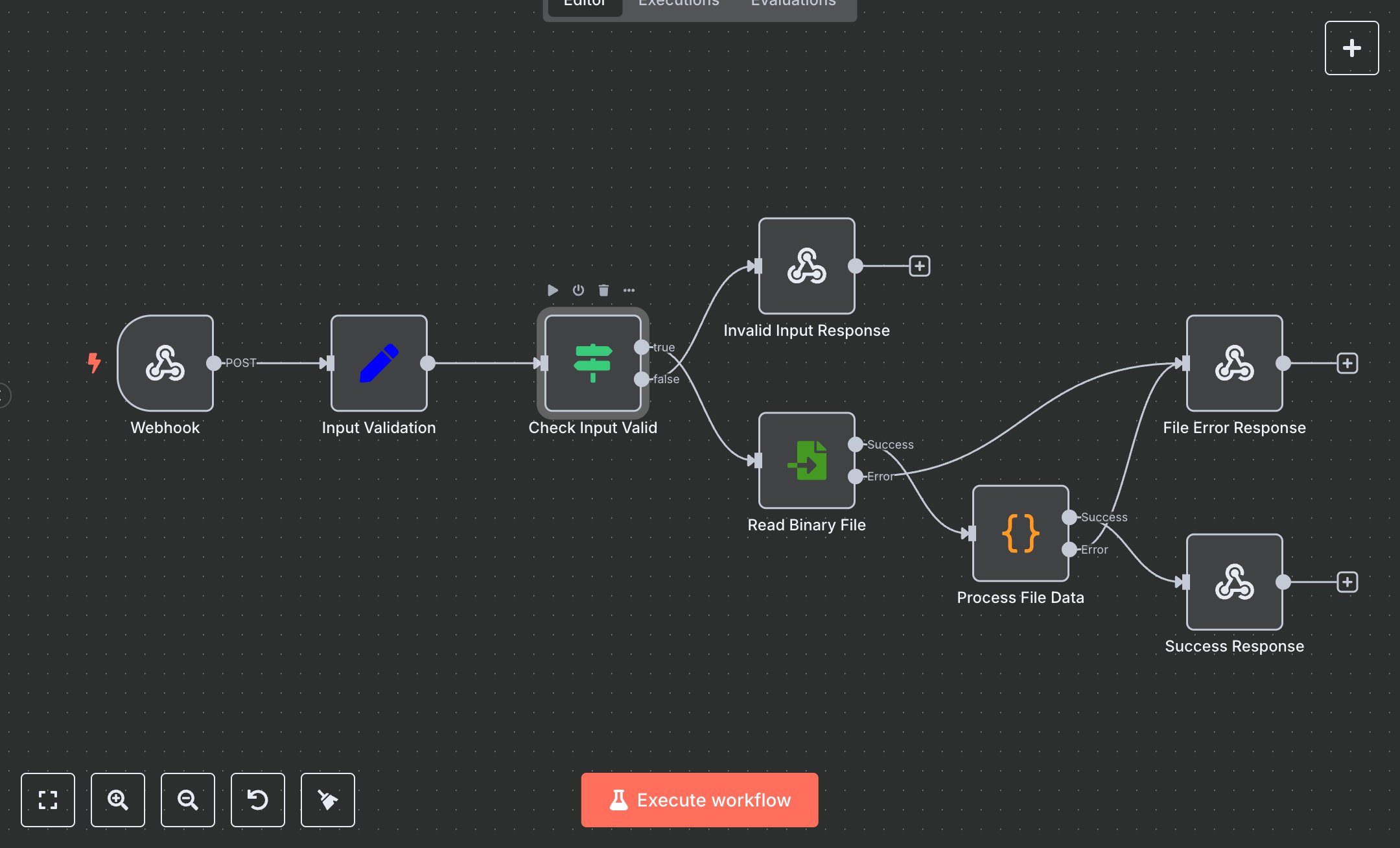
This workflow automates secure binary file reading via webhook, replacing manual file serving or insecure downloads that risk exposure and take 5-10 minutes per request for developers. The Webhook receives file paths, the Input Validation Set node sanitizes, the Check Input Valid If node routes, the Read Binary File node retrieves, the Process File Data Function validates/encodes, and Success Response Respond to Webhook returns base64 data. Errors (Invalid Input/File Error Response) handle failures. It helps devs in small app teams (5-20 staff) serving 100+ files weekly, enabling API-like access without direct FS exposure, reducing breaches and simplifying integrations.\n\nThis workflow saves 2-3 hours weekly on 100 requests, enhancing security by 95%. Use cases include dynamic asset serving for web apps, file APIs for startups. Suitable for small-mid teams. Requires n8n (free self-hosted or $20/month cloud). Scalable to 500 requests/day with cloud tiers.\n\nInstall n8n via n8n.io or cloud.n8n.io. No external services needed. Import JSON, configure Webhook POST 'read-file'. Ensure /tmp permissions for safe paths. Webhook URL: https://your-n8n-instance/webhook/read-file.\n\nTest with Postman: {filePath: '/tmp/test.bin'}. Verify base64 in response. Errors: Invalid path (400), read fail (404). Activate webhook. Monitor dashboard weekly. Optimize timeouts; refresh auth quarterly.", "businessValue": "Saves 2-3 hours/week on 100 file requests", "setupTime": "15-25 minutes", "difficulty": "Beginner", "requirements": ["n8n instance (free self-hosted or $20/month cloud)"], "useCase": "Secure API for binary file retrieval"
$3.49
Workflow steps: 8
Integrated apps: webhook, set, if