Customer.io Unsubscribe Management
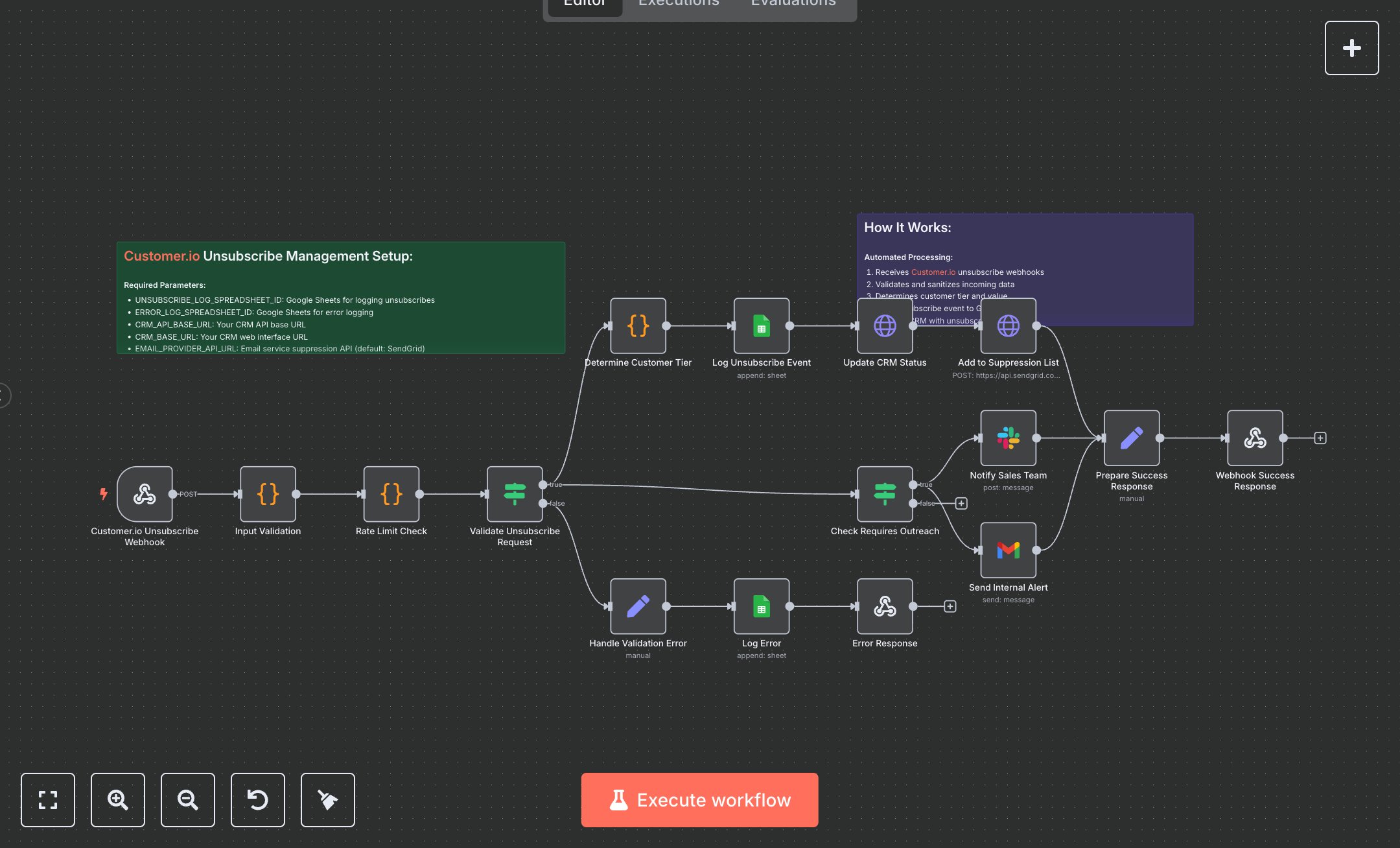
This workflow automates Customer.io unsubscribe processing, updating CRM records, suppression lists, and notifying teams for high-value customers. Key nodes include Customer.io Unsubscribe Webhook (receives unsubscribe events), Input Validation (sanitizes data), Rate Limit Check (limits requests), Determine Customer Tier (classifies customers), Log Unsubscribe Event (Google Sheets logging), Update CRM Status (CRM API update), Add to Suppression List (email provider API), Notify Sales Team (Slack alerts), Send Internal Alert (Gmail notifications), Webhook Success Response (returns JSON). It uses Customer.io, CRM, SendGrid (default), Google Sheets, Slack, and Gmail APIs. Setup Requirements Install n8n from n8n.io or sign up at cloud.n8n.io. Import the JSON into n8n’s workflow editor. Obtain CRM API key from your CRM provider (e.g., HubSpot, Salesforce); configure httpHeaderAuth credentials. Get a SendGrid API key at sendgrid.com (API Keys section); set httpHeaderAuth for Email Provider API. Configure Google Sheets OAuth2 credentials via Google Cloud Console (APIs > Credentials > OAuth 2.0). Create Google Sheets for UNSUBSCRIBE_LOG_SPREADSHEET_ID and ERROR_LOG_SPREADSHEET_ID (URL: /spreadsheets/d/SPREADSHEET_ID/). Create a Slack app at api.slack.com for a Bot User OAuth Token; configure Slack API credentials. Set up Gmail OAuth2 credentials at console.developers.google.com. Set CRM_API_BASE_URL, CRM_BASE_URL, EMAIL_PROVIDER_API_URL (default: SendGrid), ENTERPRISE_DOMAINS (e.g., enterprise.com,business.com), SALES_SLACK_CHANNEL (default: #sales-alerts), ALERT_EMAIL_RECIPIENTS, and ALLOWED_ORIGINS (default: https://customer.io). Copy the Customer.io Unsubscribe Webhook URL. Handle errors like invalid email (400: INVALID_REQUEST) or missing API keys (401: Unauthorized). Secure credentials. Testing and Deployment Import the JSON into n8n. Set all credentials and parameters. Test the webhook with a sample Customer.io unsubscribe payload. Verify Update CRM Status updates records, Add to Suppression List adds emails, Notify Sales Team sends alerts for high-value customers, and Webhook Success Response returns JSON. Test with an invalid email (400: INVALID_REQUEST) or rate limit (400: RATE_LIMIT_EXCEEDED). Monitor API limits (429: Too Many Requests). Configure the webhook in Customer.io, activate the workflow, and deploy for automated unsubscribe management.
$5.49
Workflow steps: 18
Integrated apps: webhook, code, if