Website Lead Management System
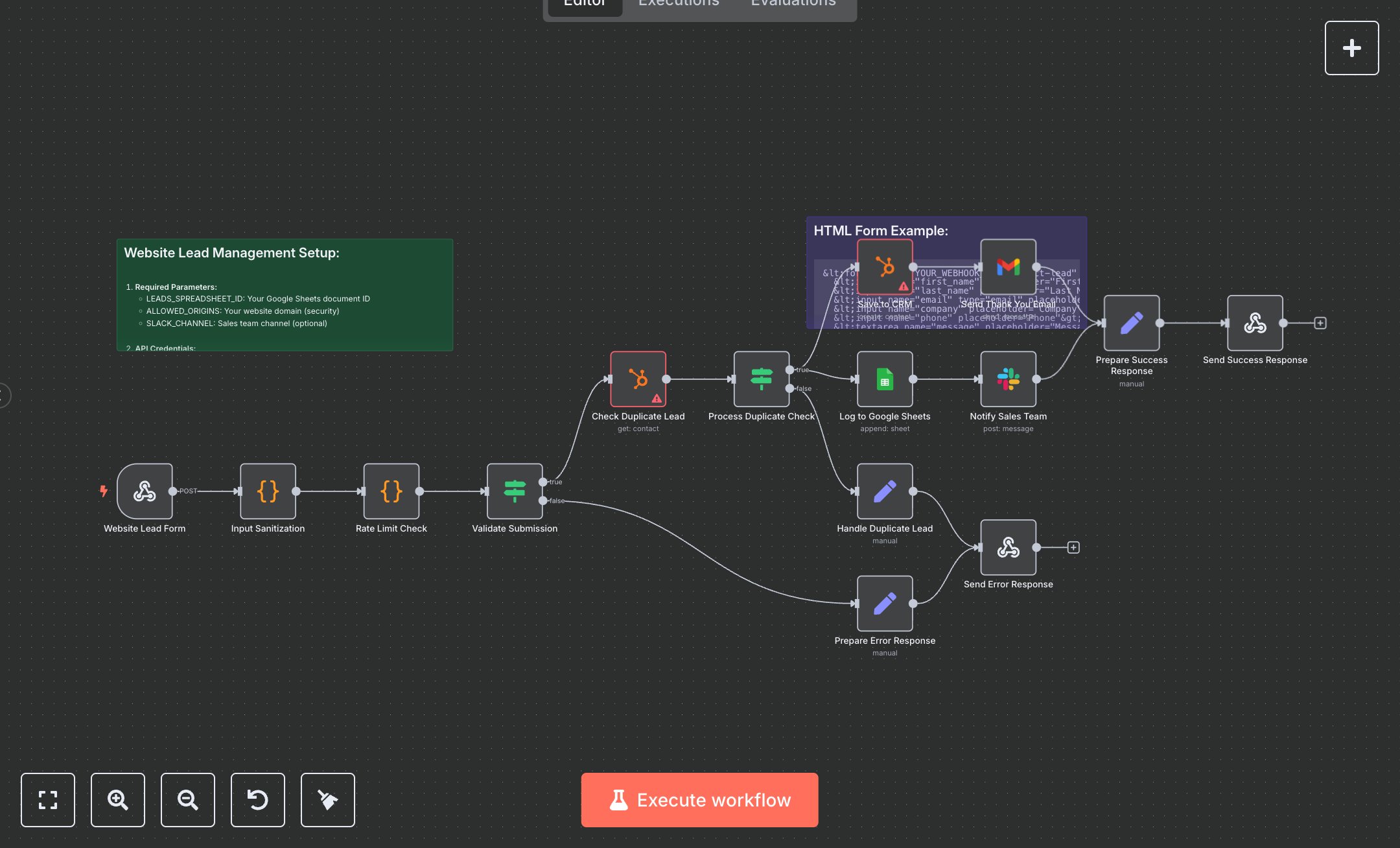
This workflow manages website form leads, saving them to HubSpot, logging to Google Sheets, sending thank-you emails via Gmail, and notifying Slack. Key nodes include Website Lead Form (webhook), Input Sanitization (cleans data), Rate Limit Check (limits submissions), Validate Submission (checks validity), Check Duplicate Lead (HubSpot API), Save to CRM (creates contact), Log to Google Sheets (logs data), Send Thank You Email (Gmail API), Notify Sales Team (Slack API), Send Success Response (returns JSON). It uses HubSpot, Google Sheets, Gmail, and Slack APIs. Setup Requirements Install n8n from n8n.io or sign up at cloud.n8n.io. Import the JSON into n8n’s workflow editor. Get a HubSpot API token at app.hubspot.com (Integrations > API Key); configure hubspotAppToken credentials. Create a Google Sheets spreadsheet, note its ID (URL: /spreadsheets/d/SPREADSHEET_ID/), and replace LEADS_SPREADSHEET_ID in Log to Google Sheets. Set googleSheetsOAuth2Api credentials via Google Cloud Console (APIs > Credentials > OAuth 2.0). Set up Gmail OAuth2 at console.developers.google.com; configure Gmail OAuth2 credentials. Create a Slack app at api.slack.com, get a Bot User OAuth Token, and configure Slack API credentials. Set ALLOWED_ORIGINS to your website domain and SLACK_CHANNEL (default: #sales). Copy the Website Lead Form webhook URL (path: collect-lead) for form submissions. Handle errors like invalid email (400: Invalid Submission) or missing HubSpot token (401: Unauthorized). Secure credentials. Testing and Deployment Import the JSON into n8n. Set HubSpot, Google Sheets, Gmail, and Slack credentials, update spreadsheet ID, and domain. Test with a POST request to the webhook (fields: first_name, email, etc.). Verify Save to CRM creates a HubSpot contact, Log to Google Sheets appends data, Send Thank You Email delivers, Notify Sales Team posts to Slack, and Send Success Response returns JSON. Test with an invalid email (400: Invalid Submission) or a duplicate lead (409: Duplicate). Monitor rate limits (429: Too Many Requests). Update the form HTML with the webhook URL, activate the workflow, and deploy for live lead processing.
$6.99
Workflow steps: 17
Integrated apps: webhook, code, if