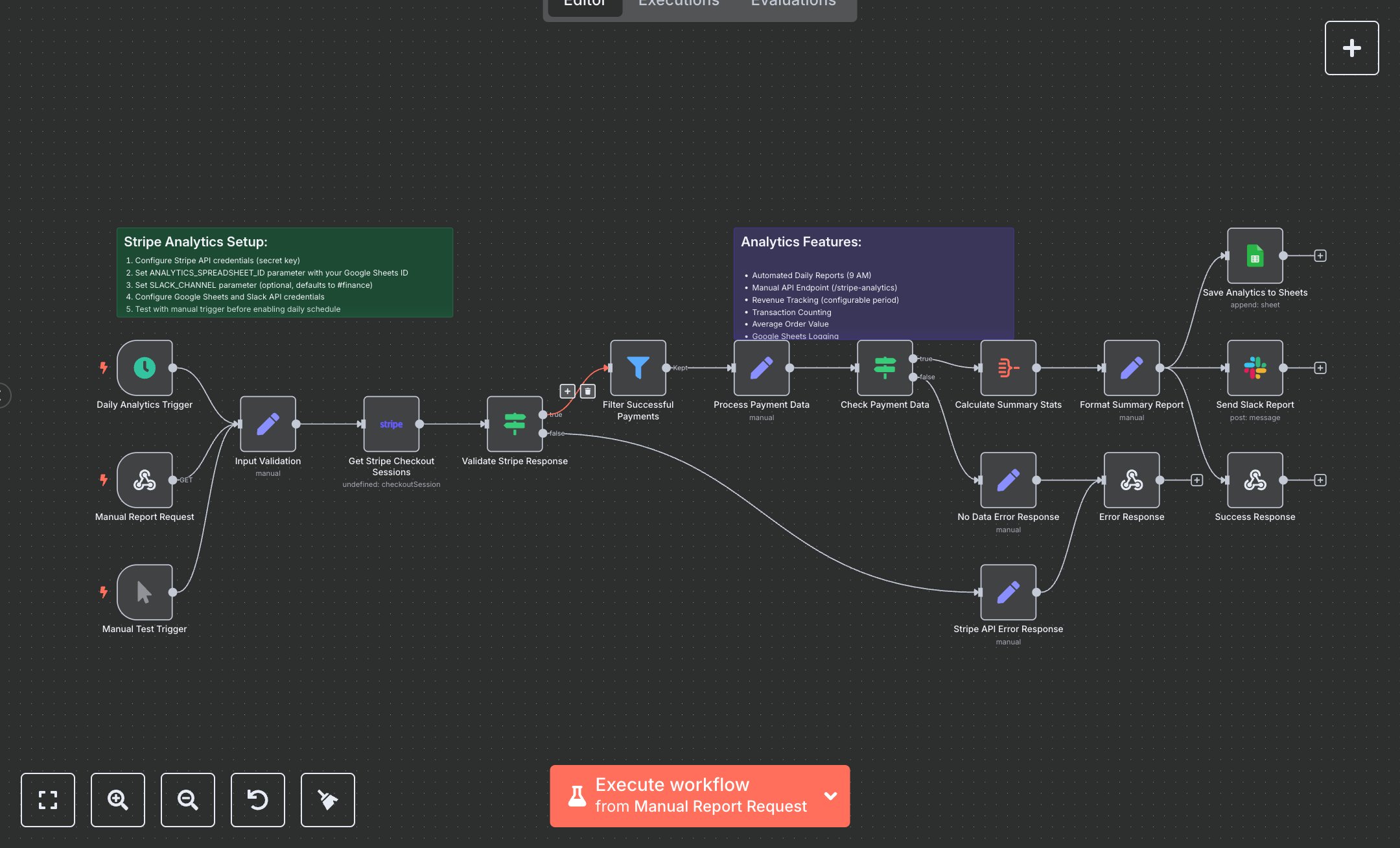
Stripe Analytics Dashboard
This workflow generates daily Stripe payment analytics, logs to Google Sheets, and sends Slack reports. Key nodes include Daily Analytics Trigger (cron trigger), Manual Report Request (webhook), Input Validation (sets parameters), Get Stripe Checkout Sessions (Stripe API call), Validate Stripe Response (checks data), Filter Successful Payments (selects paid transactions), Process Payment Data (formats data), Calculate Summary Stats (aggregates metrics), Format Summary Report (prepares output), Save Analytics to Sheets (logs data), Send Slack Report (notifies channel), Success Response (returns JSON). It uses Stripe, Google Sheets, and Slack APIs. Setup Requirements Install n8n from n8n.io or sign up at cloud.n8n.io. Import the JSON into n8n’s workflow editor. Get a Stripe API secret key at dashboard.stripe.com (Account > API Keys); configure stripeApi credentials. Create a Google Sheets spreadsheet, note its ID (URL: /spreadsheets/d/SPREADSHEET_ID/), and replace ANALYTICS_SPREADSHEET_ID in Save Analytics to Sheets. Set googleSheetsOAuth2Api credentials via Google Cloud Console (APIs > Credentials > OAuth 2.0). Create a Slack app at api.slack.com, get a Bot User OAuth Token, and configure Slack API credentials. Set SLACK_CHANNEL (default: #finance). Copy the Manual Report Request webhook URL (path: stripe-analytics) for GET requests. Handle errors like invalid Stripe key (401: Unauthorized) or wrong spreadsheet ID (403: Forbidden). Secure credentials. Testing and Deployment Import the JSON into n8n. Set Stripe, Google Sheets, and Slack credentials, update spreadsheet ID, and Slack channel. Use the Manual Test Trigger to simulate a report. Verify Get Stripe Checkout Sessions retrieves payments, Save Analytics to Sheets logs metrics (Total Revenue, Transactions), Send Slack Report posts to the channel, and Success Response returns JSON with analytics. Test with an invalid Stripe key (401: Unauthorized) or empty payment data (400: NO_PAYMENT_DATA). Monitor Stripe rate limits (429: Too Many Requests). Update allowedOrigins for your domain, activate the workflow, and deploy for daily 9 AM analytics or manual webhook requests.
$6.99
Workflow steps: 19
Integrated apps: scheduleTrigger, webhook, manualTrigger