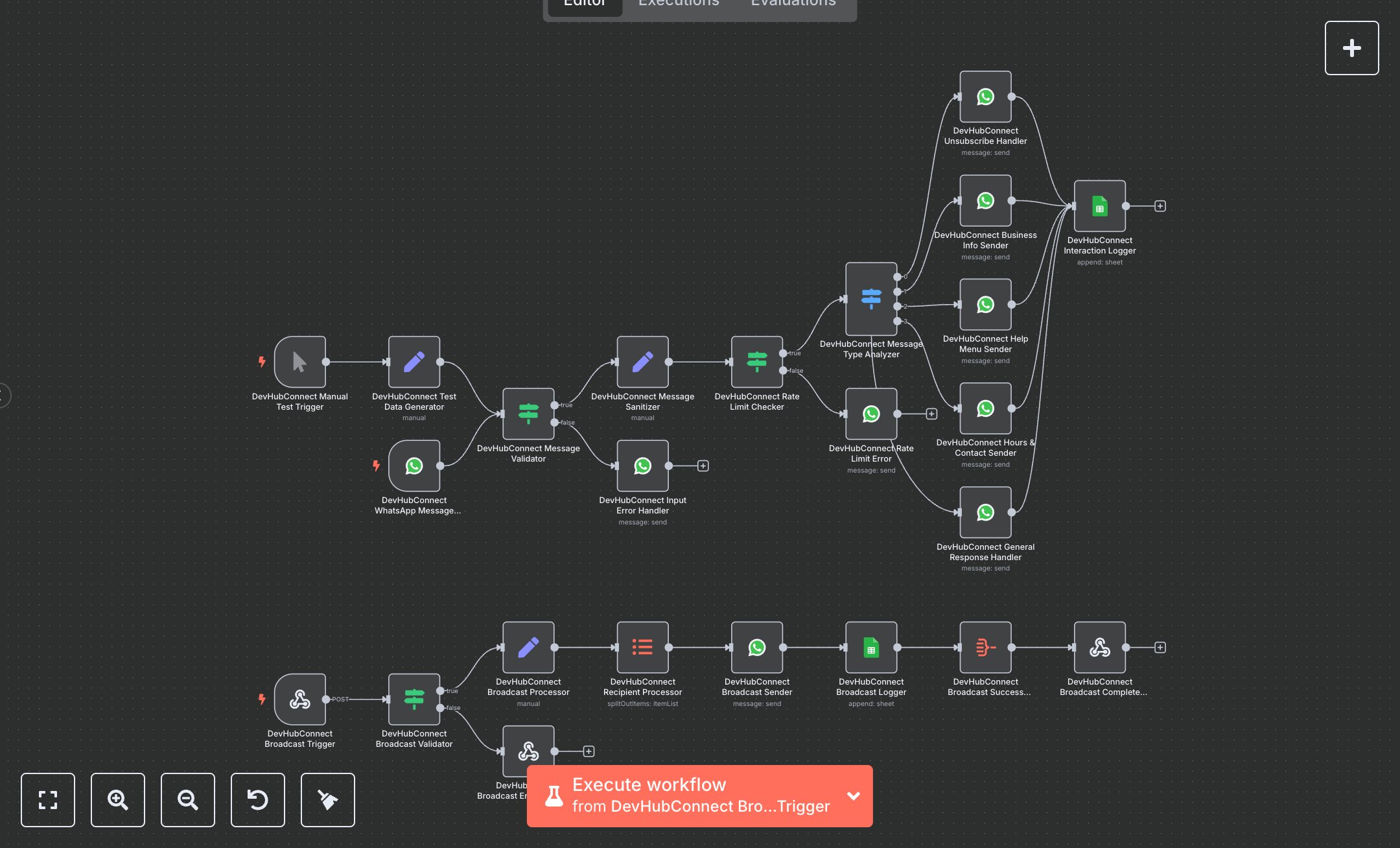
WhatsApp Business Responses: Handle Commands, Broadcasts, and Interaction Log
This workflow automates WhatsApp-based customer service, handling inquiries and broadcasting messages. Key nodes include WhatsApp Trigger (receives messages), Condition (validates inputs), Switch (categorizes messages), Set (sanitizes data, processes broadcasts), WhatsApp (sends responses, broadcasts), Google Sheets (logs interactions), Webhook (triggers broadcasts), and Respond to Webhook (returns broadcast status). It supports commands like INFO, HOURS, STOP, and general queries, with error handlers for invalid inputs and rate limits. The workflow uses the WhatsApp Business API for messaging and Google Sheets for logging.\n\nSetup requirements and configuration: Install n8n from n8n.io (self-hosted) or sign up at cloud.n8n.io. Obtain WhatsApp Business API credentials (phone number ID, access token) from developers.facebook.com. Get Google Sheets OAuth2 credentials from console.developers.google.com. Create a Google Sheet with sheets 'customer_interactions' (columns: timestamp, date, time, message_id, customer_name, phone_number, message_content, response_type, status, service_type) and 'broadcast_campaigns' (columns: broadcast_id, timestamp, recipient_phone, message_content, delivery_status, campaign_type). Import the JSON workflow in n8n. Configure WhatsApp Trigger, WhatsApp, and Webhook nodes with WhatsApp credentials, and Google Sheets with Google credentials in ‘Credentials.’ Set environment variables WHATSAPP_TOKEN, WHATSAPP_PHONE_NUMBER_ID, and ensure internet access. Configure WhatsApp Trigger and Webhook URLs in n8n settings, ensuring public accessibility (e.g., via ngrok for local setups) Testing and deployment steps: Activate the workflow to generate webhook URLs. Set the WhatsApp Trigger URL in Meta’s developer portal and the Webhook URL for broadcasts. Send test messages via WhatsApp (e.g., ‘HELP’, ‘INFO’, ‘STOP’). For broadcasts, send a POST request to the Webhook URL with JSON: {"message": "Test offer", "phone_numbers": ["+1234567890"]}. Verify responses for commands and broadcast delivery in WhatsApp. Check Google Sheets for logged interactions and broadcast details. Monitor logs for errors like ‘Invalid WhatsApp token,’ ‘Message too long,’ or ‘Missing phone numbers.’ Test invalid inputs (e.g., empty message) to trigger the Input Error Handler. Ensure responses include customer names, message IDs, and broadcast confirmations include recipient counts.
$6.99
Workflow steps: 24
Integrated apps: whatsAppTrigger, if, whatsApp