Webflow CMS Content Manager
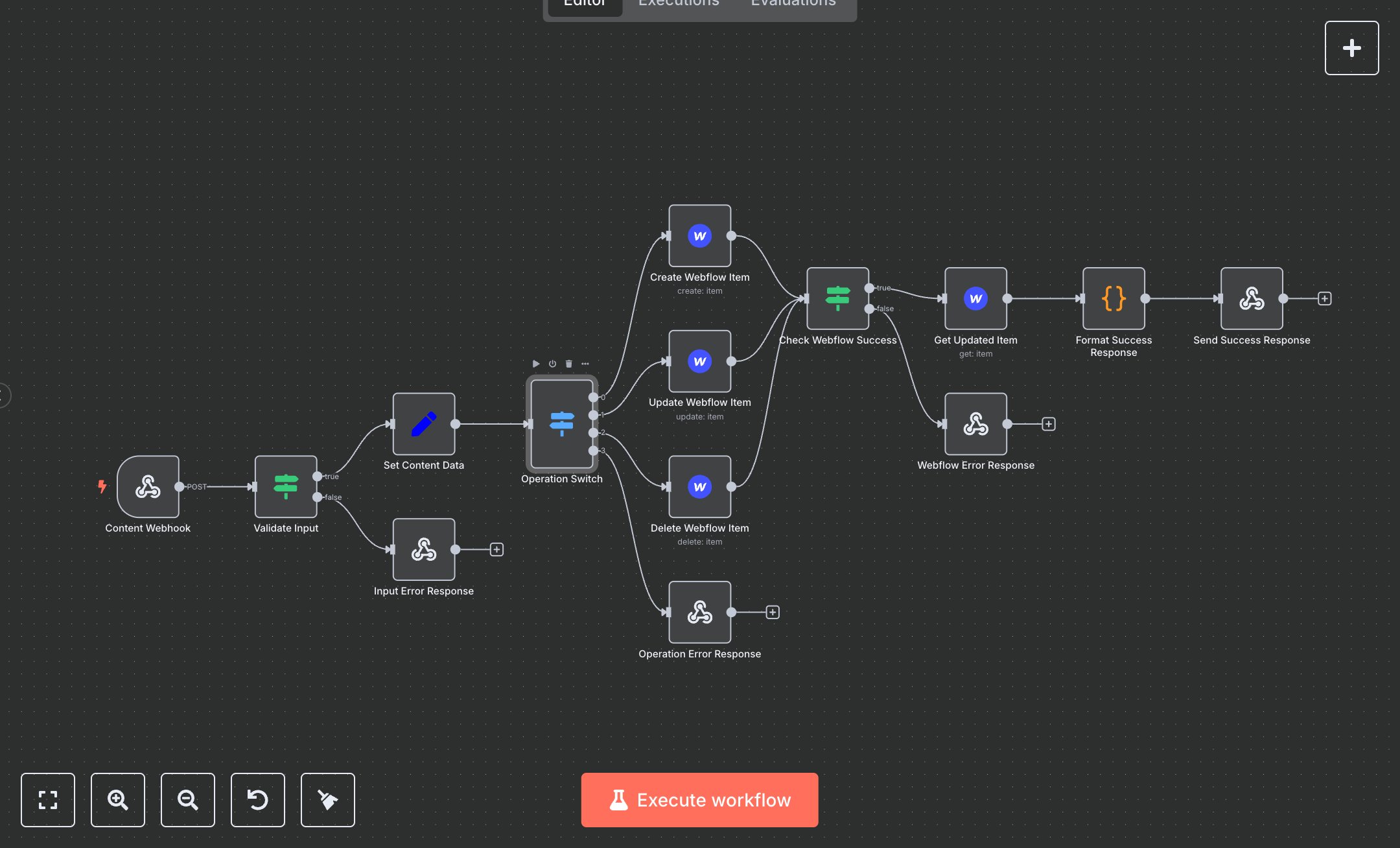
This workflow manages Webflow CMS content (create, update, delete) via a webhook. Key nodes include Content Webhook (receives content data), Validate Input (checks name), Input Error Response (handles missing name), Set Content Data (formats name, slug, avatar), Operation Switch (routes create/update/delete), Create/Update/Delete Webflow Item (interacts with Webflow API), Operation Error Response (handles invalid operations), Check Webflow Success (verifies API success), Webflow Error Response (handles API errors), Get Updated Item (fetches item details), Format Success Response (structures output), Send Success Response (returns results). It uses the Webflow API to manage CMS items.\n\nSetup Requirements: Install n8n from n8n.io or sign up at cloud.n8n.io. Import the JSON into n8n’s workflow editor. Create a Webflow account at webflow.com, get an API token (Account > API Tokens), and note your siteId and collectionId (CMS > Collections > Settings). Configure n8n credentials: webflowApi with your token. Set Webhook Trigger path to webflow-content. Optionally, add headerAuth (Bearer YOUR_TOKEN) for security. Replace YOUR_SITE_ID and YOUR_COLLECTION_ID in Create/Update/Delete Webflow Item nodes. Ensure your app sends POST requests with JSON: {\"name\": \"Item Name\", \"slug\": \"item-slug\", \"avatar\": \"image-url\", \"operation\": \"create\", \"itemId\": \"optional-id\"}. Handle errors like missing name (400: Name is required) or invalid credentials (500: Webflow API operation failed).\n\nTesting and Deployment: Import the JSON into n8n. Test by sending a POST request to the webhook URL with JSON: {\"name\": \"Test Item\", \"slug\": \"test-item\", \"avatar\": \"https://example.com/image.jpg\", \"operation\": \"create\"}. Verify Create Webflow Item adds the item and Send Success Response returns status 200 with item details (e.g., id, name, slug). Test update/delete with valid itemId and operation (update/delete). Check for errors like missing name (400: Name is required), invalid operation (400: Invalid operation), or incorrect credentials (500: Webflow API operation failed). Monitor for rate limits (429: Too Many Requests). If items aren’t created, verify siteId/collectionId. Activate the workflow and ensure the webhook is live. Deploy for reliable CMS management.
$6.99
Workflow steps: 14
Integrated apps: webhook, if, respondToWebhook