Google Slides Thumbnail Extractor
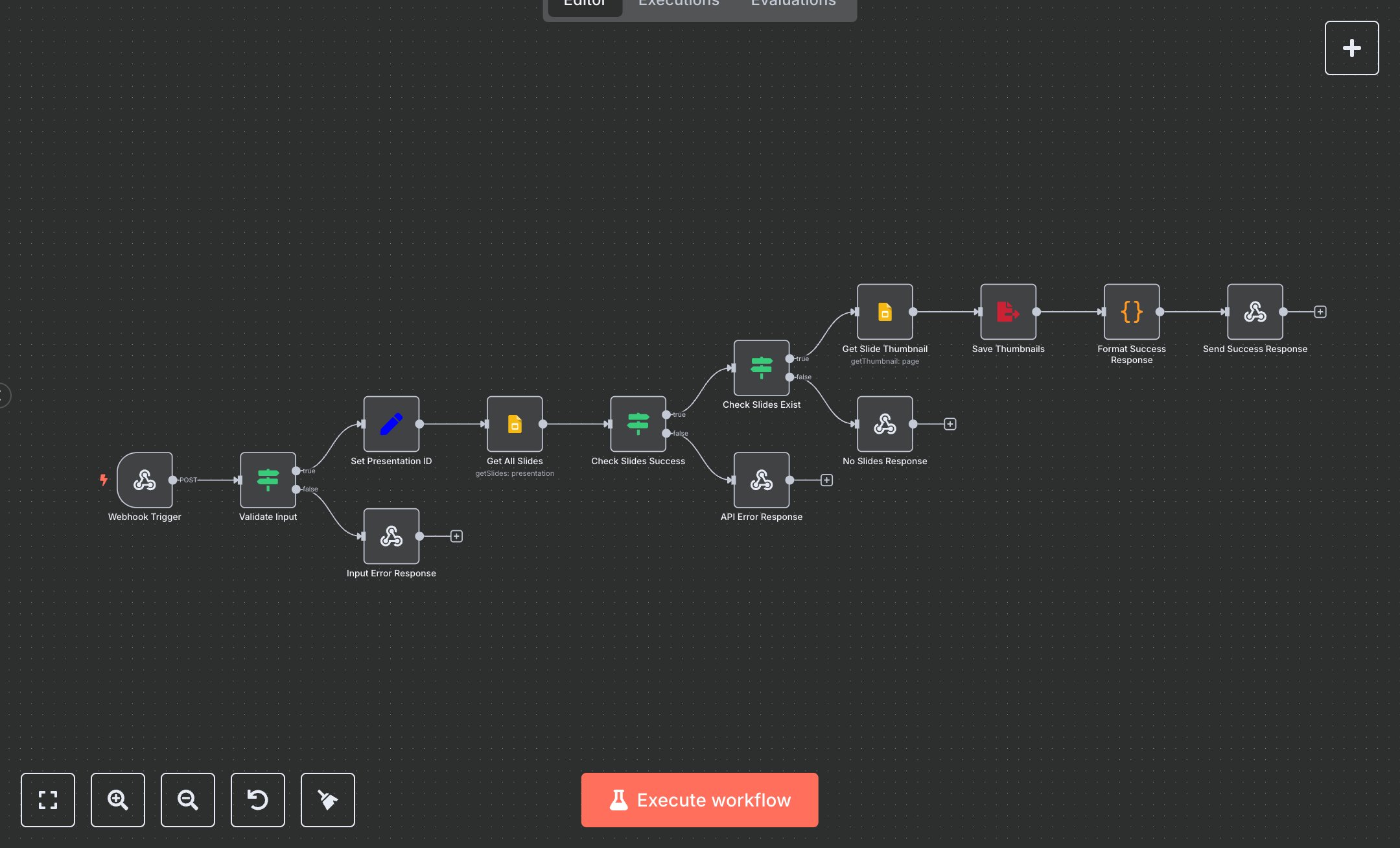
This workflow extracts thumbnails from Google Slides presentations via a webhook. Key nodes include Webhook Trigger (receives presentationId), Validate Input (checks presentationId), Input Error Response (handles missing input), Set Presentation ID (stores presentationId), Get All Slides (fetches slides via Google Slides API), Check Slides Success (verifies API success), API Error Response (handles API errors), Check Slides Exist (ensures slides exist), No Slides Response (handles empty presentations), Get Slide Thumbnail (downloads thumbnails), Save Thumbnails (saves images), Format Success Response (prepares output), Send Success Response (returns results). It uses the Google Slides API to retrieve and save slide thumbnails as PNG files.\n\nSetup Requirements: Install n8n from n8n.io or sign up at cloud.n8n.io. Import the JSON into n8n’s workflow editor. Create a Google Cloud project at console.developers.google.com, enable the Google Slides API, and generate OAuth2 credentials (APIs > Credentials > OAuth 2.0 Client, select Desktop App). Configure n8n credentials: googleSlidesOAuth2Api with your OAuth2 credentials. Set Webhook Trigger path to google-slides-thumbnails with no authentication (or add headerAuth: Bearer YOUR_TOKEN if required). Ensure your app sends POST requests with JSON: {\"presentationId\": \"your-presentation-id\"}. Find the presentationId in the Google Slides URL (e.g., docs.google.com/presentation/d/[presentationId]). Handle errors like missing presentationId (400: Missing required field) or invalid credentials (500: Failed to retrieve slides).\n\nTesting and Deployment: Import the JSON into n8n. Test by sending a POST request to the webhook URL with JSON: {\"presentationId\": \"valid-presentation-id\"}. Verify that Get All Slides fetches slides, Get Slide Thumbnail downloads images, and Save Thumbnails saves PNG files. Confirm Send Success Response returns status 200 with successful thumbnails and slides array. Test with invalid presentationId (400: Missing required field) or incorrect credentials (500: Failed to retrieve slides). Check for rate limits (429: Too Many Requests). If thumbnails aren’t saved, verify presentationId and API permissions. Activate the workflow and ensure the webhook is live. Deploy for reliable thumbnail extraction.
$5.49
Workflow steps: 13
Integrated apps: webhook, if, respondToWebhook