Copy-Paste: Coda Row Insertions from Forms and Webhooks
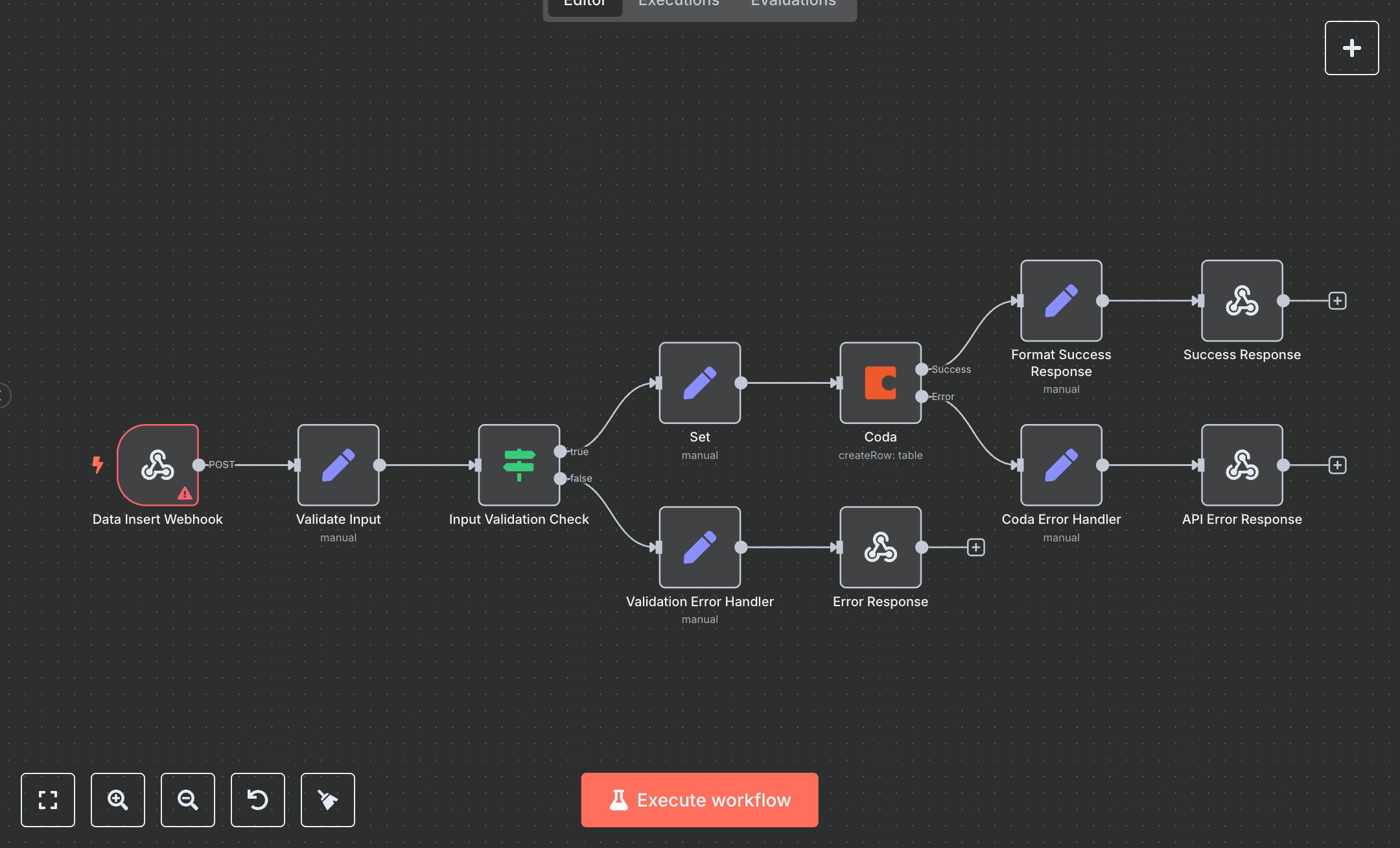
This workflow automates data insertion into Coda tables, addressing the business challenge of manual entry from external sources like forms, emails, or APIs. It replaces tedious copy-pasting or spreadsheet imports by receiving POST requests via webhook, validating inputs, formatting data, and creating rows in specified Coda documents and tables. Key nodes include Webhook for triggering on incoming data, Set for input extraction and default values, IF for validation checks ensuring required fields like Column 1 are present, Coda for row creation using the API, and Respond To Webhook for sending JSON responses with success details or errors. Additional Set nodes handle response formatting and error messages. This streamlines operations for teams using Coda as a central database, such as operations managers handling 100+ weekly entries from sales leads or customer feedback, reducing errors and ensuring data consistency without manual intervention.\n\nThe ROI includes saving 4-6 hours weekly per user on data entry for 100+ records, with automated validation preventing invalid submissions. Use cases fit small to mid-size teams (10-100 employees) in project management or CRM, like marketing firms tracking campaign data or HR logging employee info. Requirements: Coda account (free for basic API access, Pro $10/month per Doc Maker for advanced features). Scalability limited by Coda API rate limits (e.g., 100 requests/minute) and table sizes.\n\nInstall n8n from n8n.io or use cloud.n8n.io. Generate Coda API token via account settings at coda.io (Bearer auth). Configure credentials in n8n: Add Coda API with token, set default docId/tableId if needed. Webhook setup: Define path like 'coda-insert', enable header authentication for security (e.g., API key). Use standard nodes: Webhook (POST), Set for data mapping, IF for conditions, Coda (createRow operation).\n\nTest by sending POST requests with JSON body (e.g., {column1: 'Value', docId: 'abc', tableId: 'grid-123'}) using tools like Postman; verify row insertion in Coda. Common errors: Validation failures (400—check required fields), API errors (500—invalid token or IDs, re-generate token). Deploy by activating workflow, expose webhook URL securely. Maintenance: Monitor executions for failures, rotate API tokens periodically. Optimize: Add Wait nodes for rate limits, expand validation for more columns.", "businessValue": "Saves 4-6 hours/week automating data entry for 100+ records into Coda", "setupTime": "20-30 minutes", "difficulty": "Beginner", "requirements": ["Coda account with API token", "Read/write access to documents and tables", "n8n installation and basic webhook knowledge"], "useCase": "Automating row insertions into Coda tables from external APIs or forms"
$3.49
Workflow steps: 11
Integrated apps: webhook, set, if