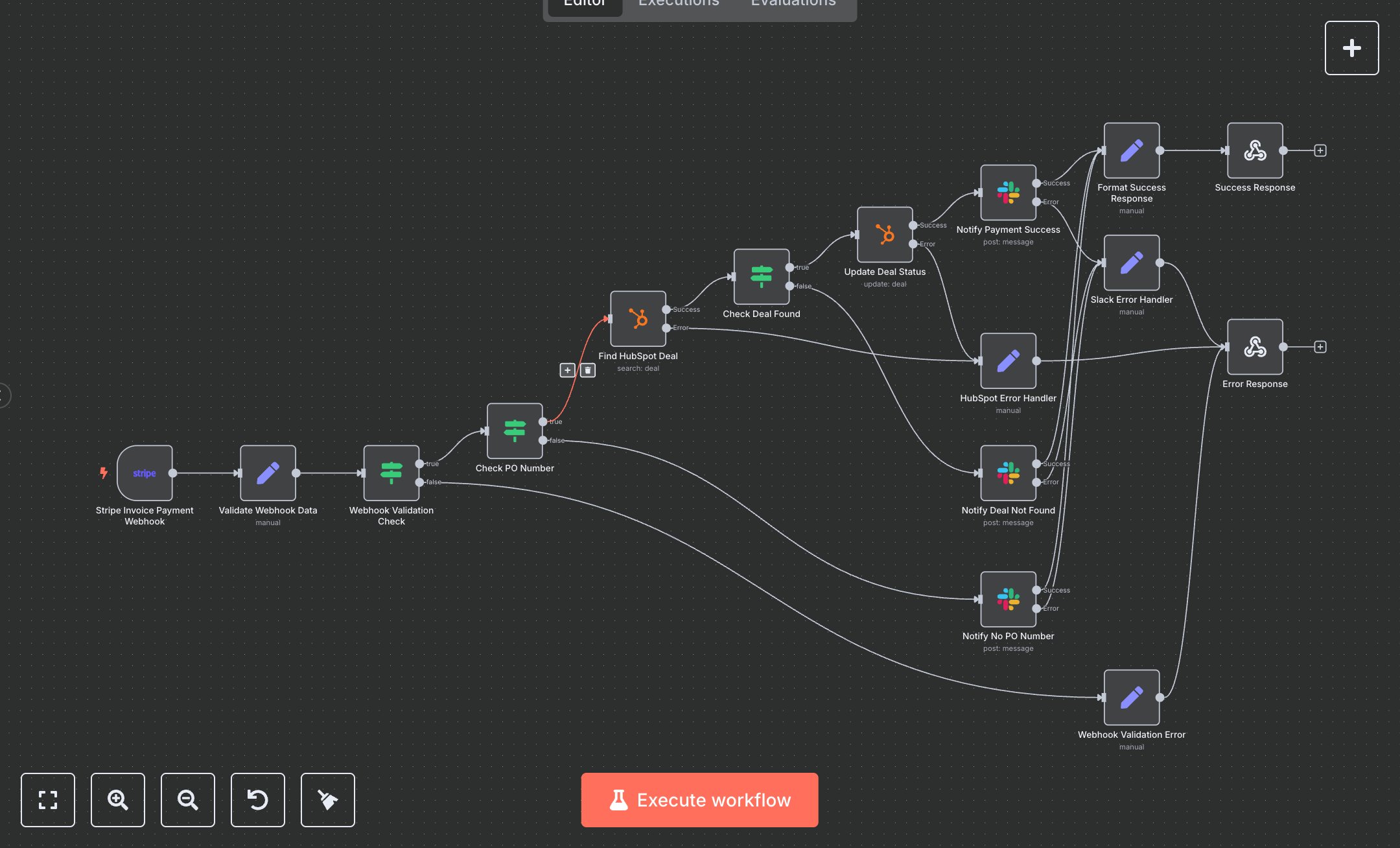
Stripe Payment Update: Sync HubSpot and Notify Team on Slack
This workflow processes Stripe invoice payments, updates HubSpot deals, and sends Slack notifications. Key nodes include Stripe Invoice Payment Webhook (receives payment events), Validate Webhook Data (extracts invoice details), Webhook Validation Check (ensures valid data), Check PO Number (verifies purchase order), Find HubSpot Deal (searches by PO number), Check Deal Found (confirms deal exists), Update Deal Status (marks deal as paid), Notify Payment Success (sends Slack notification), Notify No PO Number (alerts missing PO), Notify Deal Not Found (alerts unmatched deal), Format Success Response (prepares success output), Success Response (returns success), Webhook Validation Error (handles invalid input), HubSpot Error Handler (handles HubSpot API errors), Slack Error Handler (handles notification errors), Error Response (returns errors). It uses Stripe, HubSpot, and Slack APIs.\n\nSetup Requirements: Install n8n from n8n.io or sign up at cloud.n8n.io. Import the JSON into n8n’s workflow editor. Create a Stripe account at stripe.com, get an API key and webhook secret (Dashboard > Developers > API Keys/Webhooks). Set up HubSpot OAuth2 credentials at app.hubspot.com (Integrations > API Key). Create a Slack app at api.slack.com, get a Bot User OAuth Token, and set a default channel. Configure n8n credentials: Stripe (stripeApi), HubSpot (hubspotOAuth2Api), Slack (slackApi). In Stripe, add a webhook endpoint for invoice.payment_succeeded events, using n8n’s webhook URL (from Stripe Invoice Payment Webhook node) and the webhook secret. Handle errors like missing invoice ID (400: WEBHOOK_VALIDATION_ERROR) or invalid HubSpot credentials (500: HUBSPOT_API_ERROR).\n\nTesting and Deployment: Import the JSON into n8n. Test by simulating a Stripe webhook event via Stripe CLI (stripe trigger invoice.payment_succeeded) with a valid invoice including a PO number. Verify Find HubSpot Deal locates the deal, and Update Deal Status marks it as paid. Confirm Notify Payment Success sends a Slack message, and Success Response returns status 200 with transactionId. Test with invalid webhook data (empty data.object) to trigger Error Response (400: WEBHOOK_VALIDATION_ERROR). Test with incorrect HubSpot credentials (500: HUBSPOT_API_ERROR) or Slack token (500: SLACK_NOTIFICATION_ERROR). Monitor for rate limits (429: Too Many Requests). If notifications fail, verify Slack channel settings. Activate the workflow and ensure the webhook is live. Deploy for reliable payment processing.
$6.99
Workflow steps: 16
Integrated apps: stripeTrigger, set, if