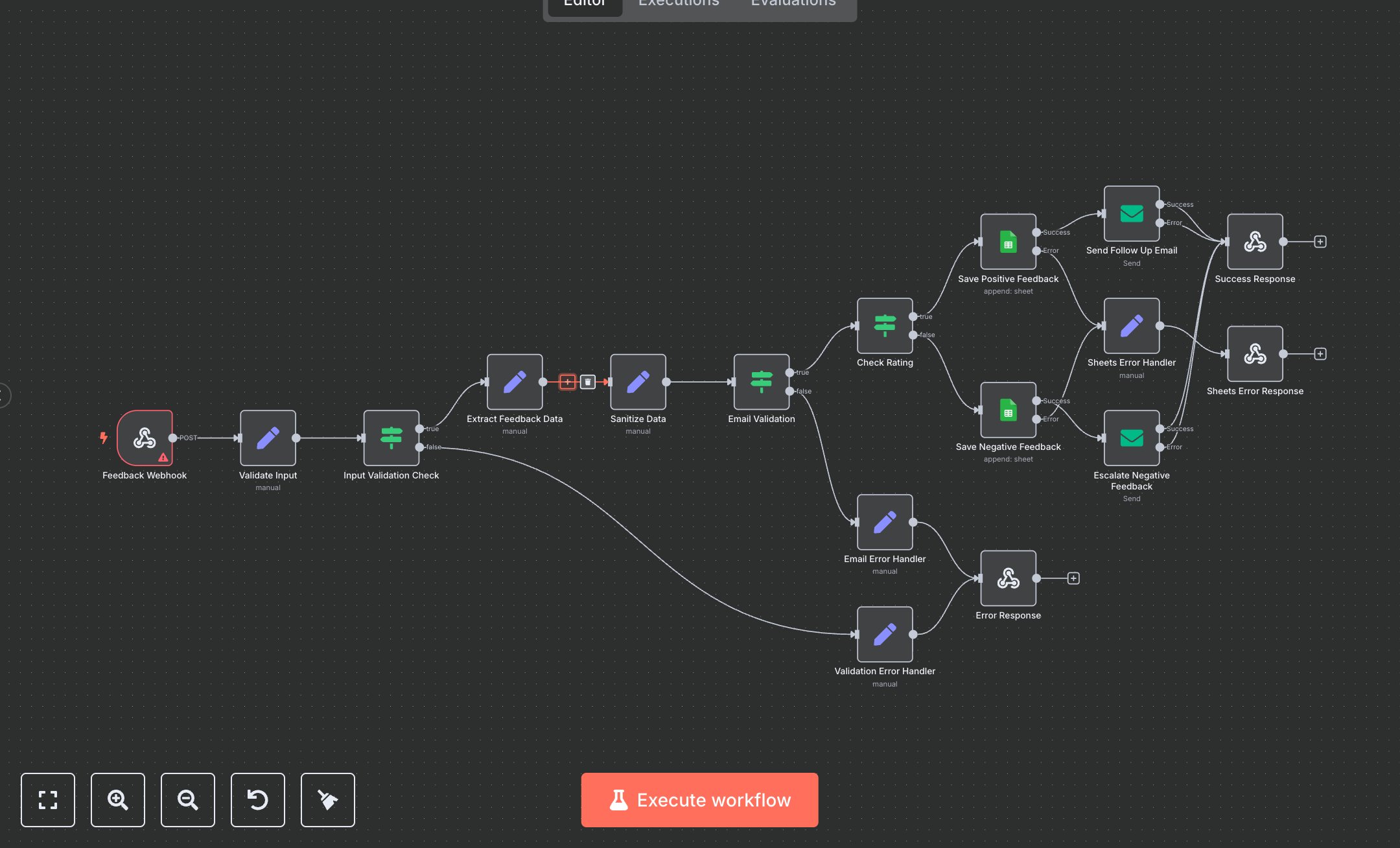
Feedback Collection Workflow
This workflow collects and processes feedback via webhook, storing it in Google Sheets and sending follow-up emails. Key nodes include Feedback Webhook (receives requests), Validate Input (sets source, response ID), Input Validation Check (ensures valid data), Extract Feedback Data (pulls feedback details), Sanitize Data (cleans inputs), Email Validation (checks email format), Check Rating (routes by rating), Save Positive/Negative Feedback (stores in Google Sheets), Send Follow Up Email (sends thank-you email), Escalate Negative Feedback (notifies management), Success Response (returns success), Validation/Email/Sheets Error Handler (handles errors), Error Response (returns validation errors), Sheets Error Response (returns storage errors). It uses Google Sheets and SMTP.\n\nSetup Requirements: Install n8n from n8n.io or sign up at cloud.n8n.io. Import the JSON into n8n’s workflow editor. Create a Google Sheets spreadsheet with 'Positive_Feedback' and 'Negative_Feedback' sheets (header row: Name, Email, Course, Rating, Feedback, Source, Submitted_At, Response_ID). Set up Google Sheets OAuth2 credentials at console.developers.google.com (APIs > Credentials > OAuth 2.0 Client). Configure SMTP credentials for email (e.g., Gmail SMTP: smtp.gmail.com, port 587). Set Feedback Webhook path to your-webhook-path with header authentication (Bearer YOUR_TOKEN). Configure your app to send POST requests with source, response_id, name, email, feedback, course, and rating. Handle errors like missing response ID (400: VALIDATION_ERROR) or invalid email (400: EMAIL_VALIDATION_ERROR). Set header auth in n8n (Credentials > HTTP Header Auth).\n\nTesting and Deployment: Import the JSON into n8n. Test by sending a POST request to the webhook URL with JSON: {\"source\": \"survey\", \"response_id\": \"test123\", \"name\": \"John\", \"email\": \"john@example.com\", \"feedback\": \"Great course\", \"course\": \"Math\", \"rating\": 8} and valid auth header. Verify, Sanitize Data cleans inputs, and Save Positive Feedback stores in Google Sheets. Confirm Send Follow Up Email sends for ratings ≥6. Check Success Response returns status 200 with responseId. Test with empty body ({}) to trigger Error Response (400: VALIDATION_ERROR). Test with an invalid email to trigger Email Error Handler (400: EMAIL_VALIDATION_ERROR). Test with incorrect Sheets credentials to trigger Sheets Error Response (500: SHEETS_ERROR). Monitor for rate limits (429: Too Many Requests). If storage fails, verify Google Sheets credentials. Activate the workflow and ensure the webhook is live. Deploy for reliable feedback processing.
$6.99
Workflow steps: 17
Integrated apps: webhook, set, if