ChargeBee Invoice Management
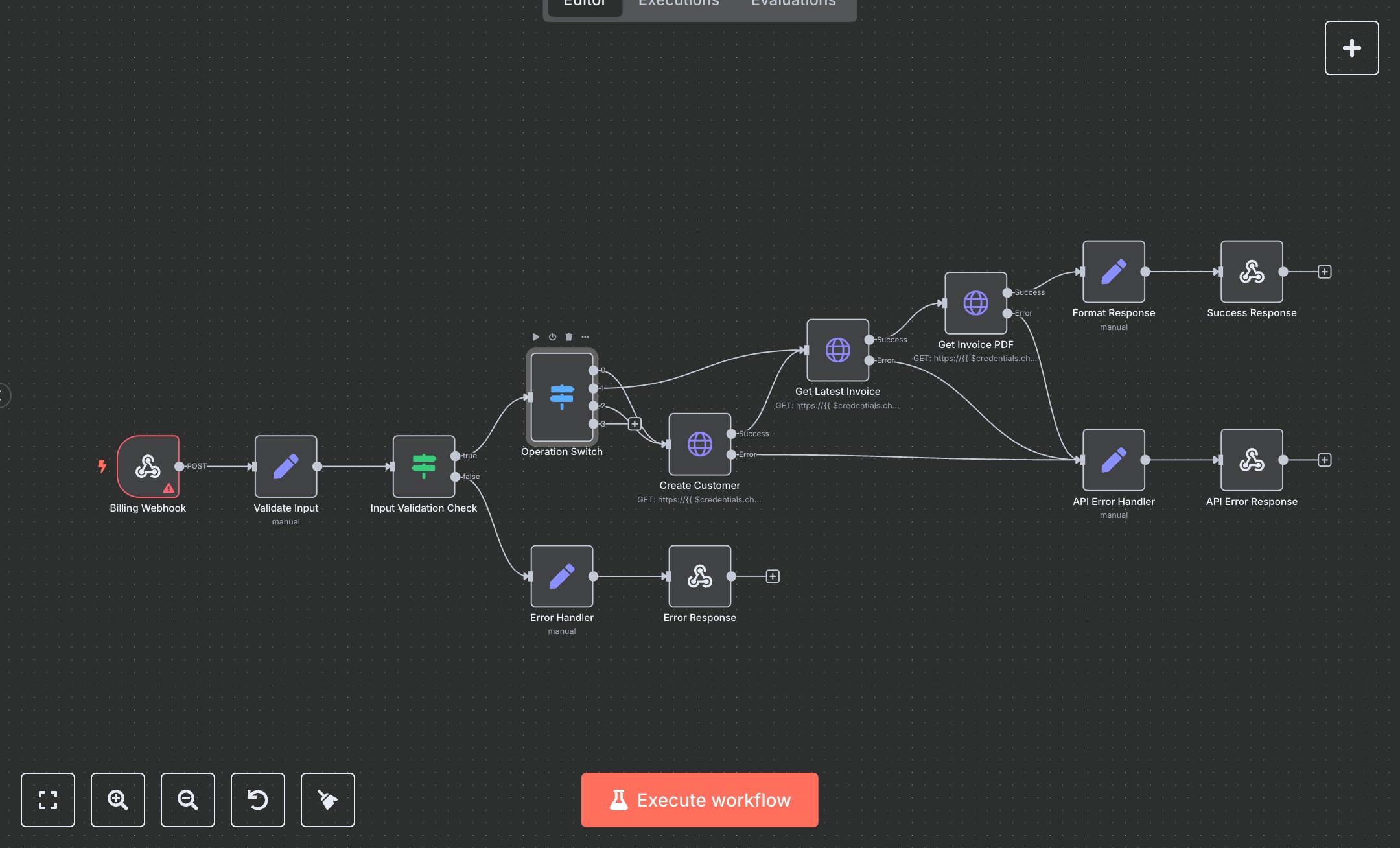
This workflow manages ChargeBee customers and invoices via webhook. Key nodes include Billing Webhook (receives requests), Validate Input (sanitizes data), Input Validation Check (ensures valid email), Operation Switch (routes operations), Create Customer (adds customer via API), Get Latest Invoice (fetches invoice), Get Invoice PDF (retrieves PDF), Format Response (prepares output), Success Response (returns success), Error Handler (handles invalid inputs), API Error Handler (catches API errors), Error Response (returns validation errors), API Error Response (returns API errors). It uses the ChargeBee API.\n\nSetup Requirements: Install n8n from n8n.io or sign up at cloud.n8n.io. Import the JSON into n8n’s workflow editor. Sign up at chargebee.com to get an API key and site domain (Settings > API Keys). In n8n, configure ChargeBee API credentials (httpBasicAuth) with the API key and domain (e.g., 'your-site'). Set Billing Webhook path to your-webhook-path with header authentication (Bearer YOUR_TOKEN). Configure your app to send POST requests with operation ('create_customer', 'get_invoice', 'full_process'), customerId, firstName, lastName, email, and optional company. Handle errors like invalid email (400: VALIDATION_ERROR) or incorrect API key (500: API_ERROR). Set header auth in n8n (Credentials > HTTP Header Auth).\n\nTesting and Deployment: Import the JSON into n8n. Test by sending a POST request to the webhook URL with JSON: {\"operation\": \"full_process\", \"customerId\": \"cust123\", \"firstName\": \"John\", \"lastName\": \"Doe\", \"email\": \"john@example.com\"} and valid auth header. Verify Validate Input extracts data, and Create Customer adds a customer. Confirm Get Latest Invoice and Get Invoice PDF return invoice details and PDF URL. Check Success Response returns status 200 with customer and invoice data. Test with an invalid email (email: '') to trigger Error Response (400: VALIDATION_ERROR). Test with incorrect API key to trigger API Error Response (500: API_ERROR). Monitor for rate limits (429: Too Many Requests). If API calls fail, verify ChargeBee credentials and domain. Activate the workflow in n8n and ensure the webhook is live. Deploy for reliable customer and invoice management with error handling and response validation.
$5.49
Workflow steps: 13
Integrated apps: webhook, set, if